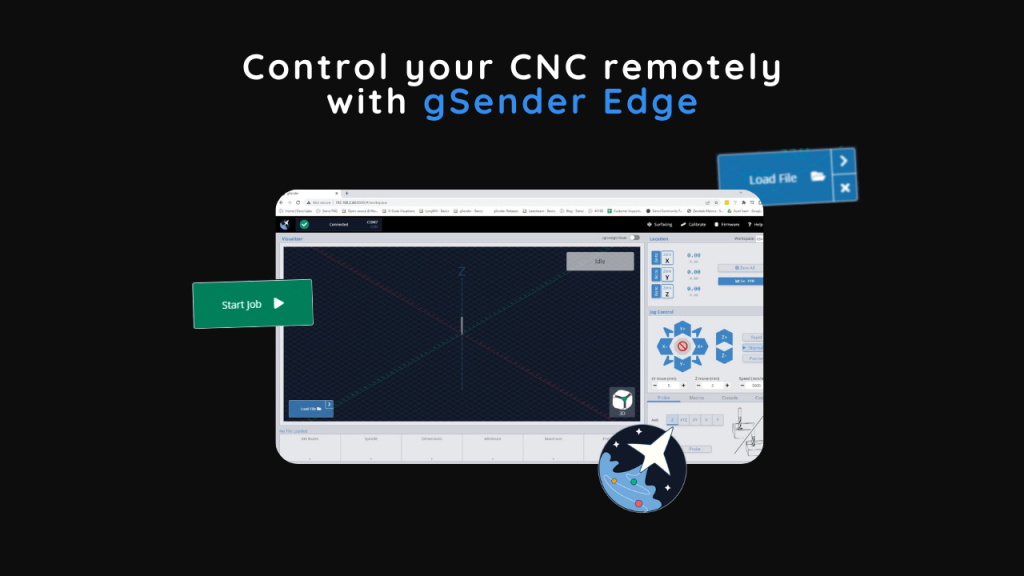
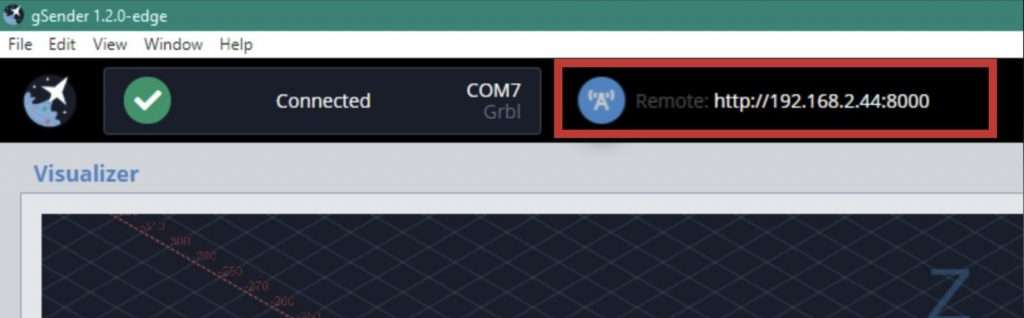
Hi everyone. If you’re a more adventurous CNC user, did you know that our experimental version of gSender includes a powerful Remote Control feature (sometimes referred to as headless) that can enable new functionality of your CNC within your shop?
You can load in a file from your design computer outside your shop and then run it on your computer inside the shop, use a tablet to control your CNC rather than a mouse and keyboard, use a phone for jogging or running functions, or leverage a mini PC or Raspberry Pi as the tethered computer for cheap, fanless, and reliable operation without taxing them with a display, keyboard, and mouse.
This feature is new so don’t expect it to be perfect, but try it out and give us feedback if you find anything we can do to improve it. Be sure you don’t use this feature to run your CNC remotely, we discourage unsafe use of the CNC including leaving it running unattended.
Follow our guide below to learn how to set up Remote Control using gSender Edge.
While you’re using Edge, try out and give us feedback on some of its other new features as well such as visualizing laser raster files, laser job outline, custom visualizer colours, and the ability to create a print of all your custom gSender keyboard shortcuts onto a piece of paper that you can hang up next to your machine. These features are easy to find and are also further explained on our release forum post here: https://forum.sienci.com/t/gsender-edge-headless-support-better-laser-support-custom-visualization-and-more/6291
Hey folks. gSender 1.1.3 has been released with firmware tool improvements, input improvements, and bug fixes/feature improvements!
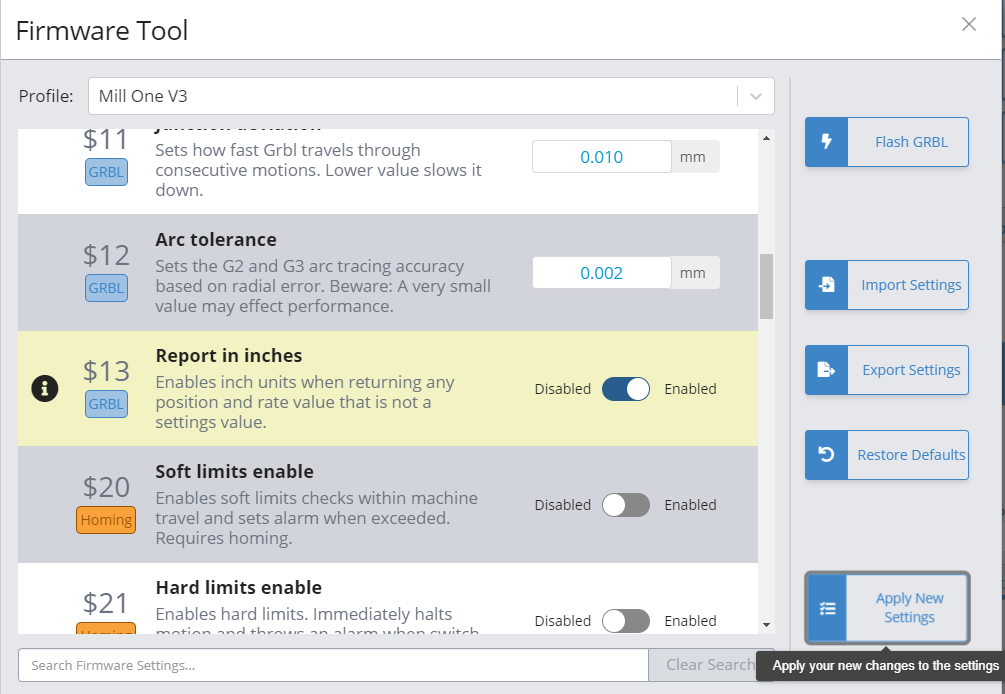
The firmware tool has a new look – settings different than the default for your selected machine profile are highlighted, you can easily look up settings by term rather than number, and machine profile is now located inside the tool instead of in preferences. We’ve also added some new machine profiles for Longmills with extension kits and some other machines.
Machine profile selection has been removed from preferences entirely. The purpose of machine profiles has been gradually lessened over each release, and the only part of the program it was still informing was the firmware tool. Due to this, we’ve removed it from preferences as a selection since it’s purpose was confusing a number of users, especially when it came to machine dimensions (which were actually pulled from EEPROM). Machine profile is now selected in the firmware tool, and only handles which image to flash/settings to use as default values.
We also have a number of feature improvements, including: UI inputs also no longer default to minimum value if the user takes longer than expected to type, Test File mode now restores WCS upon completion, and continuous jogging working more consistently when $13 (report in inches) is enabled.
Patch Notes
Added profiles for Longmill extension kits
Machine profile removed from preferences and placed in firmware tool
Fixed incorrect default values in some machine profiles
Test mode now restores WCS after the soft reset performed while exiting check mode.
Fixed issue with test mode that would occasionally have it start running the file after test was complete
Fixed issue with continuous jog when soft limits were enabled and report in inches EEPROM value was enabled
It’s not often I post here, most often it’s Andy or Kelly keeping y’all up to date on the status of things happening here at Sienci Labs Headquarters; I’m much more behind-the-scenes. Today I’ve come out of the woodwork for a very exciting and momentous announcement for us, the release of gSender 1.0.
Since much of gSenders development hasn’t made much of an appearance on the company blog, let me bring you up to speed on where this project started and what the release to 1.0 now means:
Origin
Back in 2016 when Andy and I first started Sienci Labs around our Mill One CNC, the range of free and paid g-code senders specific to operating hobby CNCs was surprising wide. Options like UGS and Candle were quite widely used and more were in active development at the time such as UGSPlatform, CNCjs, bCNC, and more. We were able to make a wide range of recommendations to our CNC users as well as made documentation around specifically UGS at the time since we felt it was the most intuitive to use.
Jumping to 2020 we’ve now got more machines in the wild then ever before. If you’re familiar with working at scale, you know that a 5% failure rate, for example, is very manageable when you’re working in the hundreds but starts to be more of a headache in the thousands. This is what we were starting to encounter with the g-code senders available at the time. And I’ll clarify, when I say “failure rate” this isn’t me saying that the software didn’t work. There were outlying bugs, quirks, and stable versions that were more stable than others; but what also stuck out was that many of the available options were made for more technically savvy people.
What were our options?
With more and more calls coming in, we could tell our users were getting confused with existing sender options. We heard questions about basic functions, confusion about behaviour, and one of the hardest things for us to hear was that our users were blaming the functionality and abilities of our CNCs in cases where we knew it was coming down to the sender. I remember personally dealing with situations of broken bits because of probing operations, or even a time I remember vividly where I helped someone out for a whole hour over the phone because he thought his file was visualizing correctly and we found that he’d just accidentally closed the visualization window within the sender.
I want to make it clear that I have the utmost respect and thanks for all those who took the time to make their own g-code senders for hobby use. These contributors to the hobby CNC community as a whole have taken the time to take what would otherwise be a personal project and have released it for the world to use. Not only that, but they continue to support updates, bug fixes, new features, and much more – all on their own time and out of the passion that they themselves have for CNC. But ultimately, the origin of these projects is what made me realize around that time that the goals of these open-source projects were never going to meet the goals that Andy and I have always had for the company: to make CNC routing fully accessible to the public. As long as open-source developers were at the helm, customization and a diverse range of features would take priority over UI design, streamlined use, and catering towards beginners by using more understandable language.
This left us with two options. Either we help fund an existing project or put more man-power toward it and get it moving in the direction we felt would be best for the next generation of g-code sender, or we begin making our own. I sent some emails around, and spoke with some other developers I knew and the consensus was that we’d go with the latter. Seeing as these projects were the ‘babies’ of each respective group of open-source developers, we felt it wouldn’t be our place to ask for more from people who wanted to do development on their own schedule, or try to push our vision onto others. Thus gSender was begun.
Goals and Principals of gSender
Starting ideation in October 2020, we began testing existing senders and outlined our core goals and design principals that we felt would guide development:
Goals
Act as new default machine interface / sender for LongMill customers (this means including all the functions and features that users are already used to from there existing sending options)
Supercharge our customers’ experience with their LongMill by streamlining / simplifying machine interaction and making even more machine operations easily available (a.k.a. nice-to-haves)
Keep design open for use by other hobby CNCers to provide benefit outside of just our own community (this means leaving some wiggle room for broader customization and adaptability to other CNC machines on the market as well as even further advanced features)
Principals
If it’s set once it doesn’t need to be visible 100% of the time
Options most users don’t need should not be obvious or take up much screen real estate
Most actions should be 1 click
“Someone off the street should be able to figure out how to get started”
Order of widgets should be close to order of operations/steps to proceed
Machine state should be obvious at a glance
Use colour patterns to subconsciously communicate button functions
Substitute CNC jargon with simple language when possible
We knew the other primary holes we wanted to fill roughly included:
Easy interface for beginners yet advanced features available for more experienced hobbyists
Smart handling of error cases, probing, jogging, firmware editing, machine connection, etc.
Built-in tools for convenient CNC management: stock/wasteboard flattening, motor calibration, machine squaring, etc.
Extensive keymapping and built-in joystick compatibility
Support of tool changing, start/stop g-code, macros, coding variables
The idea was to branch off of the well-known and provably reliable open-source codebase so we could be confident that we were starting with a good foundation to build off of. We also wanted the software to be made available easily for all systems so that future implementations could support standalone machines. After a wide range of tests performed over many weeks, CNCjs’ codebase was chosen for the previous reasons and because testing showed reliable operation on a variety of computer systems.
Present Day Release
I’m very excited to announce that gSender 1.0 is now available for free to anyone who wants it!
After nearly a year in development, the first couple months being in Alpha and the remaining ones being in BETA, we’ve now become confident enough to declare our first reliable version. We’re really excited to see more people begin to use it as we’ve now got a whole swath of great features and about 2000 users using it to run jobs every day.
Some things that you can expect from gSender in its current state:
Reliability of operation
Accommodates a wide range of computing systems via its ‘Lightweight mode’
Easy to understand and use due to its interface layout
Takes care of a lot of complexities behind the scenes, making mistakes and errors less likely and easier to deal with when they do happen
Built-in tools for surfacing, machine calibration, firmware editing
Ability to ‘start from line’, tool change, run custom macros, quick-travel with limit switches, and much more
If you’d like to learn more, we’ve got a primary download page, a documentation area, our full Github page, a discussion forum, and even though we’ve reached 1.0 we’ll still be releasing new dev builds for the foreseeable future as we continue development on gSender:
The team and I are very excited that we’ve reached this point. We set out to make our very own open-source and FREE g-code sender after gaining inspiration from some of the other commonly available options and we feel we’ve made a strong start towards those goals. To get here we owe a huge amount of thanks to our original 10 Alpha testers (you know who you are 😉 ), all those who participated in BETA testing and sending us suggestions and feedback, and importantly our greatest thanks to Will Winder and Cheton Wu for driving the UGS and CNCjs projects that not only were there for our initial users but also acted as a indispensable step towards us embarking on this project ourselves.
We want gSender to be the next-level open-source sender that’s available for all green CNCers to turn to whether they own a LongMill or otherwise: guided and easy to approach as a beginner yet customizable and feature-rich for higher-tier hobby CNCers. This means that it not only works for our Mill One and LongMill CNCs, but has already been proven to work on other machines like X-Carve, Shapeoko, Bob’s CNC, 3018, PROVer, and many more!
If you’re interested, the full list of features up to this point is as follows 😀 :
3-axis digital readout (DRO) with manual value entry
All-directional jogging with XY diagonals, jog presets, and incremental/continuous single-button handling
Zero-setting and gotos (independent and combined)
Probing in any direction plus safe continuity detection ensures no broken cutting tools
Full imperial/metric compatibility
Responsive screen design and workspace customizations including visualizer light and dark theme
3D toolpath visualization (no machine connection required)
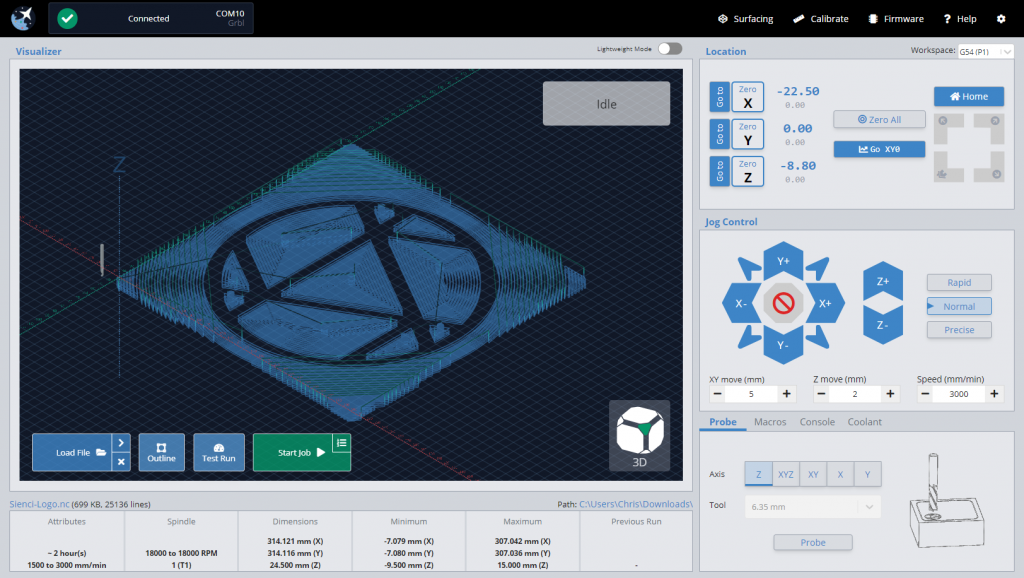
File insight on load (feed range, spindle range, tools used, estimated cutting time, and overall, max, and min dimensions)
Feed override and active job status indicators
Fully exposed keyboard shortcuts for external keyboard/keypad control
Joystick support built-in for a variety of controllers
Safe height movements – accommodates machines with or without endstops
Homing cycle and quick-movement locations available for machines with homing hardware
Full spindle/laser support via manual control widgets, active alerting, and live overrides
Full mist/flood coolant support via manual control widgets and active alerting
Macros buttons (rearrangeable) with enhanced macro variables and individually assignable keyboard shortcuts
Lightweight mode reduces processing intensity on less powerful hardware or when running larger files
Easy workspace swapping for more advanced jigging or alignment work
Optional automatic handling for common error throwing g-code
Firmware tool for easier GRBL EEPROM changes, loading defaults, and GRBL flashing
Surfacing tool auto-generates surfacing g-code based on machine cutting area and other preferences, ready to execute
Calibration tool for axis alignment – a step by step process to make sure your CNC is square
Movement tuning tool for calibrating motor axis movements
Tool change functionality – pause, ignore, or run code blocks on M6 commands
Start-from-line functionality to resume jobs part-way through in case of failure of abort
Outline functionality indicates the rough bounds of the job before cutting
Customizable g-code injection at job start & end
Tooltips for data entry points
Alarm warning explanations to better contextualize CNC errors
Sleep management to keep PC awake during g-code sending
Pre-built machine profiles, including: LongMill
Shapeoko
X-carve
OpenBuilds CNCs
3018 CNC & PROVer
BobsCNC CNCs
CNC4Newbie CNCs
Mill Right CNCs
Ooznest WorkBee
Nomad
Carvey
Mill One, and more…
What’s the plan moving forward?
Even though we’ll be taking a quick breather after release of 1.0, we’ll still be working toward even more features into the coming future. Some of these will include:
Headless Pi operation
Surface probing and other ‘fancier’ probing types
Built-in g-code editing
3D cutting visualization
We left these off to the side ‘till now since we know that many of them would be more appealing to the more advanced users, but we’re confident that with everything currently built-in it’ll satisfy the vast majority of y’all.
Whatever comes next, we’ll be developing in two distinct branches. One that is for stable releases only, and another that you can optionally follow if you’re okay with a little less reliability but are wanting to be a part of shaping the new features that come to gSender.
Closing
It’s been great to spill this story out to y’all, there’s been a lot going on behind the scenes here at Sienci Labs this past year and I’m excited for you all to not only get more out of your machines via gSender but also via some more upcoming projects that we’ll be announcing in the coming months. Cheers everyone!
Hey everyone. We get a lot of questions about software for CNC machines, part of which includes using a g-code sender or machine interface. If you’ve ever gotten technical support from us, there’s a good chance you might have talked to Kelly, who took some time to make this video to help answer the common questions and discuss common functionality in the software.
This video covers some of the basic features that are in g-code senders like UGS and our very own gSender.
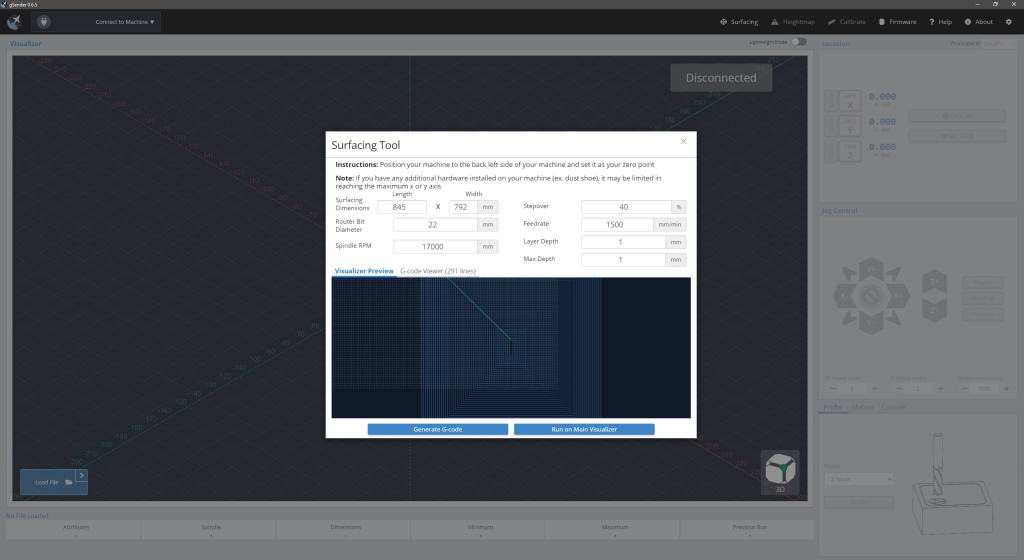
Our development team have been working hard to continue making gSender better. Our latest update improves overall performance and reliability, as well as working on new features. The latest version now comes with a surfacing tool that makes it easy to surface your wasteboard using the built in tool.
This tool lets you import your basic settings such as your tool size and speed to automatically generate the toolpaths to run on your machine. Not only can you use this to surface your machine, but you can also use it to surface other stock by changing the size on the tool.
If you aren’t on the latest version of gSender, your gSender program will have a green arrow to indicate an update is available on the upper left side where the gSender logo is.
Additional gSender Documentation continues to be in development. Feel free to check it out to learn more. Continue to stay tuned as more changes and updates come to gSender!
This is a really big milestone that I’m really excited to have reached! It’s not easy or inexpensive to be paying nearly 4 peoples salaries for coming up on 5 months just to develop a program that is being made available for free but we just really think that this labour of love is going to be something that benefits not just the LongMill community but the Hobby CNC community at large.
So I guess now is the time for me to answer the two big questions:
Why now? Though the changes between our release last week and this week aren’t drastic it’s never really clear cut when something is ready to move onward. Since this was my call, I can say that I didn’t want to make gSender public until I was sure that we had all our bases covered. This included at least a couple of iterations on builds for every OS, less reports of crashing and bugs, fulfillment of the big-ticket item requests like jogging stability and keymapping, and some refinement in the overall design that was more of a gut feeling.
How does this include the hobby CNC community as a whole? If you weren’t aware, the LongMill and many other machines such as: X-carve, Shapeoko, Bob’s. MillRight, OpenBuilds, 3018 CNCs, and more all run on the GRBL open-source firmware. This is what gSender has been built to support. This means that though gSender comes ready out-of-the-box to run a LongMill, it can also readily support many other kinds of CNCs and we’ve made it open-source and free across the board so that anyone can come on over, grab it, use it, and benefit from it. So yeah, tell your friends! No mater what CNC they use, if you’ve enjoyed using gSender then they probably will too 🙂
Alright so, of course I’ll do a quick recap of changes since the previous release and where to download, I just want to say a couple last things first:
With gSender now public, this will likely be one of the last communications made to this mailing list as all of you signed up for the duration of the closed Beta which is now concluding. Instead, I’ll likely be moving my communications over to a combination of our website blog and the Forum – we’ve got the regular Sienci Mailing list you can feel free to sign up for if you want to continue receiving development notifications
If you’ve enjoyed using gSender, I’d love it if you would take the time to respond back a review of how you find it. I don’t yet have a plan on how I’m going to use the reviews but at the least me and my dev team really grin ear-to-ear when we see you guys getting so much out of gSender so that would be some great feedback to hear
Lastly, thank you all so much for taking the time to provide your feedback – the feedback that’s brought gSender to what it is today. There will continue to be a page available for submitting gSender feedback here: https://sienci.com/gsender-feedback/ so keep it coming if you have more to say. I’m so grateful for the time and words from all of you
Okay, on to the normal stuff!
New changes:
Improvements to job handling
Tooltips created for data entry points
Splashscreen tweaks
Working PI build!?
Downloads: All downloads are now available on the gSender page on our website, check them out here! https://sienci.com/gsender/
If anyone has any further questions or need assistance downloading the new version I’ll be keeping my ear to my inbox and the gSender forum category over the weekend
Cheers cheers cheers! -Chris and the rest of the team at Sienci Labs