
Happy to announce another release of gSender Edge! This build includes a number of tweaks to prior features, some new integrations with upcoming releases you may have seen in our recent production update (simple cam and tablet pendant), and various fixes.
It’s likely the the next 2-3 Edge builds will come in relatively quick succession, and be focused on performance improvements and bug fixes rather than new functionalities as we head towards official release.
That means it’s a good time to jump in and see if you spot any issues or adjustments you want.
Helper and Alarm improvements
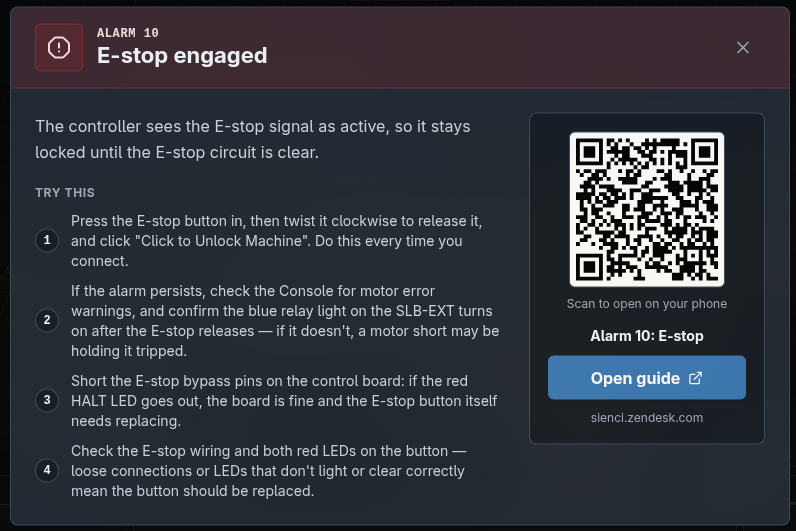
We’ve expanded the resources available inside gSender when it comes to errors and alarms. Now, when the user expands Alarm information, rather than just getting a single sentence, we include possible fixes, common things to check, and direct links to our existing resources via manual click or QR code.
This system will be expanded to a number of other areas, such as g-code validation checks or ATC options.
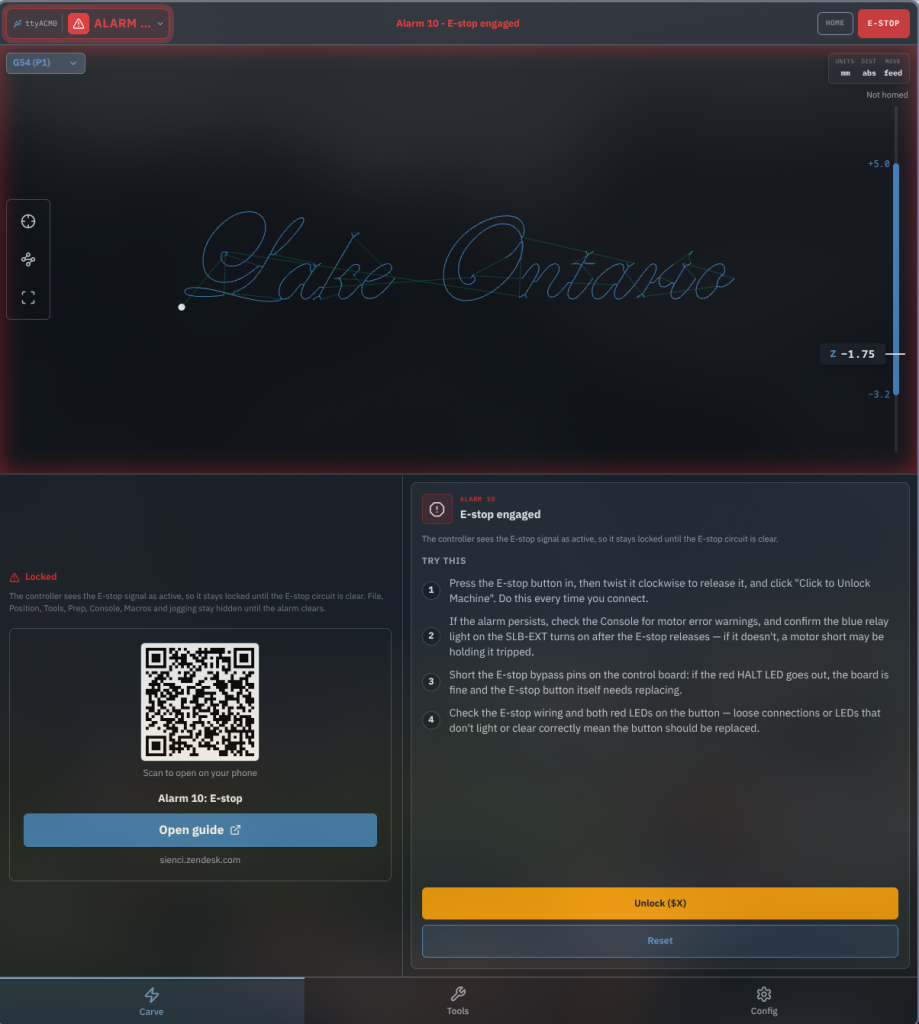
This is also integrated into the pendant view.
Changes
- Short summaries for alarms, each linked to its support article.
- Lists and tips added for most common alarms
- Report Bad Line uses the new system and includes specific line numbers for editing
- Error messages now include actual error text via controller feedback
- Added validation when connected to system with ATC installed (ATC=1) but passthrough disabled or toolchange strategy set to something other than Ignore
Expanded Plugin SDK
The plugin system is starting to see some users, and we’re adding some functionalities based on user feedback.
Changes
- Added API functionality to navigate to Carve or other routes
- Added API functionality to create and download files for saving using OS native dialogs
- Added two sample plugins, one for a HA-assistance, one for a sample tools-tab mount
- Performance fixes for leaking listeners on plugins
- Performance fixes for excessive re-renders on parsing loaded plugins
Pendant view updates
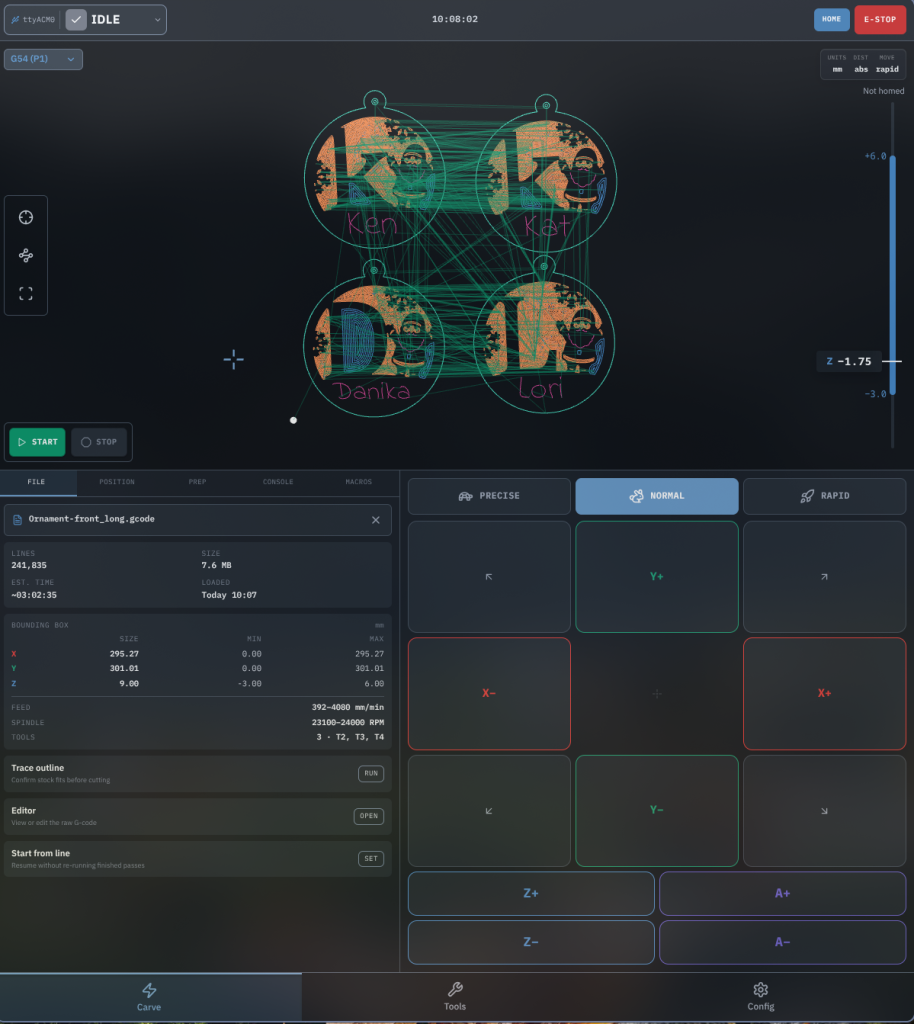
The pendant view has received a relatively larger overhaul with respect to the main carve page and functionalities.
You’ll notice a newer layout, with a more prominent visualizer, and a larger focus on commonly used controls.
We’re making some pretty large context aware changes, like hold states and alarms being whole-screen until dealt with.
Starred tools/plugins can be accessed via the main screen.
You’ll also notice some new features, like a Z-depth gauge, snap to toolpath/snap to machine bed, corner positions being directly on the machine bed indicator, hold to move and pinned tools.
We’re continuing to iterate but this is closer to our vision on what a pendant view should be like.
Changes
- New look and colour overhaul.
- Reworked Carve screen with recent files and tap-to-load. After loading a file, it switches to Carve.
- Click-to-move shows a marker, an “armed” badge and a glow.
- The rapid-position to corner control moved into the visualizer. Added a view tray and an iso fader.
- Battery indicator and sizing adjustments.
- The probe process was updated to re-introduce corner selection
- Added Z depth gauge to the right side of the visualizer to see file min and max and current Z position in the 2d visualization
- Uses the new console component
- File-loading progress indication
- All tools and plugins now available for use
- Pinned tools now available on main Carve page for quick access
- Connection and machine status re-design
- All functionalities moved to hold to use
Time estimation and file visualization improvements
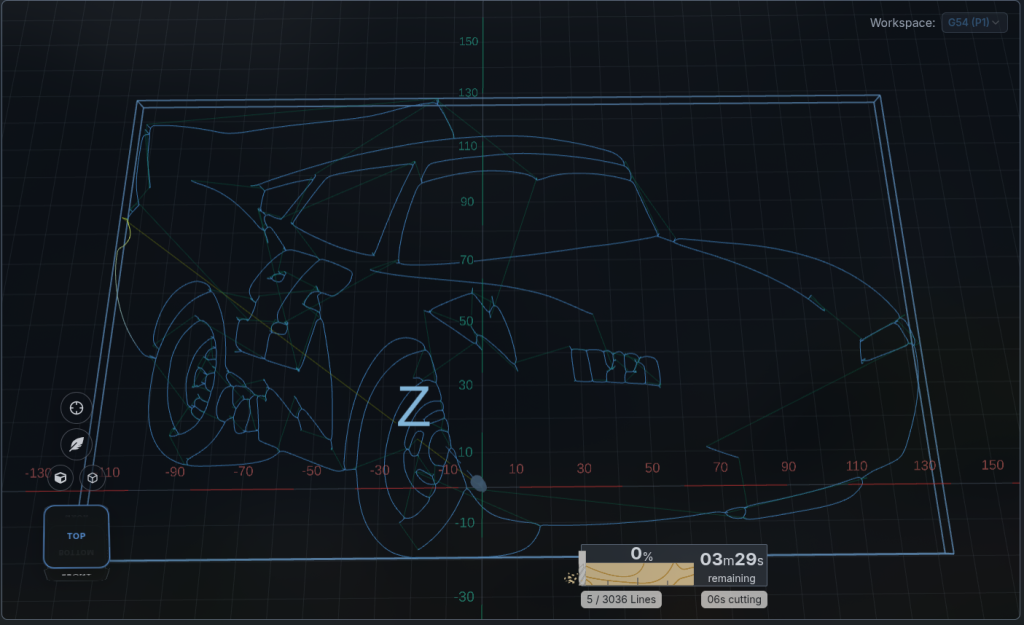
How fast a file visualizes and the memory used is one of the major performance metrics in gSender since it is one of the largest compute costs. As such, it sees continual improvements – in this build we were able to get about a 60% memory reduction when parsing larger files, and a 30% speed improvement.
This should be most noticeable on larger files and older devices.
We’ve also made some improvements to the time estimation processes, which should result in a more accurate initial estimation for both 3 and 4 axis projects.
Changes
- Visualize parser updates resulting in a 60% memory reduction for most files
- Combined some parsing efforts for quicker visualization
- Removed redundant SVG parse for some option combos
- Improvements to time estimation on 3 axis files
- Improvements to time estimation on 4 axis files
- Improved planned line highlighting calculations to not be based on time estimates.
- Re-added planning lines to visualizer and added optional direction animation
Integrations with upcoming releases
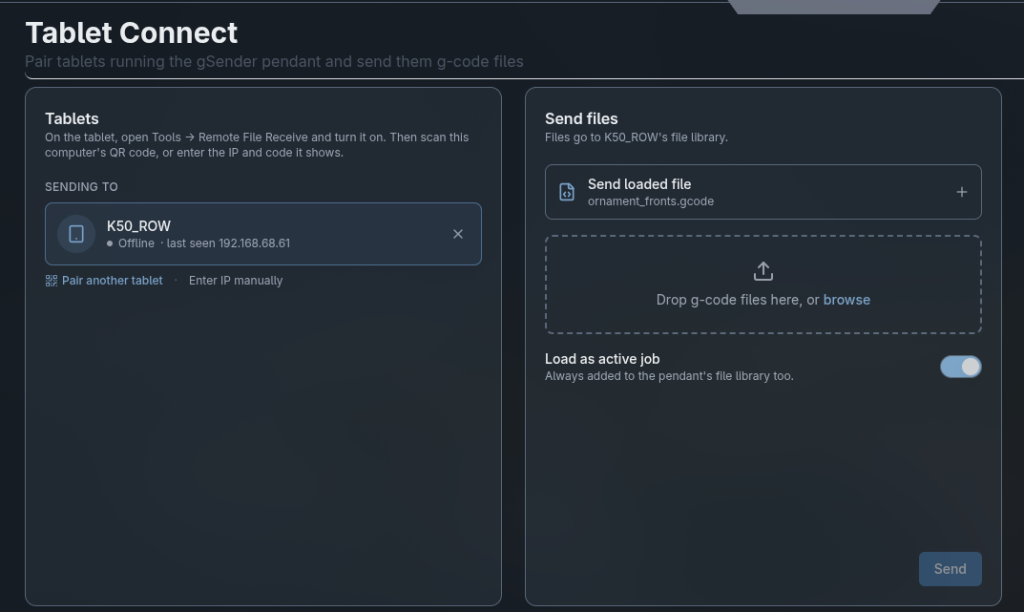
Our November production release hints at some upcoming projects related to simple CAM and a tablet interface.
We’ve started integrations in the regard inside gSender. One of which is a way to send files from gSender to the tablet – pairing using a simple QR code.
We’ve also added some integrations with the cam software – allowing toolpaths generated there to be directly sent to gSender (and also the tablet, should you desire that instead)
Most of these are config options and will not appear by default.
Changes
- Added Tablet Connect tool – a single tool to pair tablets by QR code or by code, and send them g-code files using MDNS.
- You can send several files, remove entries, or send the currently loaded file.
- Shows transfer progress across all UIs
- Added gCam handoff listener
Start of Internationalization

gSender can now be shown in German, Spanish, French, Italian and Russian as well as English. Pick a language under Config → Basics → Language; it defaults to your system language. The first areas translated are the Config/Settings page, notifications and confirmation dialogs, alarm and error help, and the main navigation.
Anything not yet translated shows in English.
Text that comes from the controller always stays in English, including firmware setting descriptions, controller alarm and error messages, and console output.
Today’s translations are machine-generated starting points, so we’d love help from native speakers: every translation is a plain JSON file in src/app/src/i18n/locales/<language>/, and you can fix or finish one by editing it on GitHub and opening a pull request, with no coding needed.
We will be adding documentation on how to contribute new language sets or tag strings for future translation.
We’ll also be looking at easier ways to collaborate/add languages moving into the future.
Changes
- New language selector in Config → Basics, built on i18next, with English as the fallback.
- Five languages (de, es, fr, it, ru), all machine-translated and waiting for community review.
- Translated so far: the Settings page, toasts and confirmation dialogs, alarm and error help, and navigation.
- Support and diagnostics reports stay in English whatever language you choose.
- New contributor guide, TRANSLATING.md.
- New yarn i18n:* scripts to extract text, report coverage, and find unused keys or hard-coded text.
- CI now checks translation files on pull requests.
- The old, unused server-side translation files were removed.
Various fixes and tweaks
- Probe corner selector is back as a Config option inside the Probe subsection
- Made EEPROM values available to macros as a a variable using the settings variable, EG settings.$10
- Various surfacing issues fixed for start from center surfacing generation
- G59.x workspace modals now work with start from line.
- Tools can now be pinned/favourited using a star. This includes plugins. Starred tools will always be at the top of the tools page
- Fixes for unit and $13 behaviour on the manual and semi-auto tool change wizards
- Updated toolpaths for Vacuum table wizard
- Fixed various Z-index issues with elements in the new visualizer
- Settings access moved to an API to be consistent across all remote connections. Remote connections automatically connect to the COM port if the main client is connected.
- Fix for surfacing generation when selecting a center origin to have the safe Z move before X and
- Updated diagnostic file generation look and feel
- File using Latin-1 characters (like degree symbol) now show correctly in tool timeline
- Tools page styling fixed to address background container not extending in dark mode
- Fixed leaking resize listener resulting in a crashing application if left open for a long time
- A number of changes to sharing backend listeners between grbl and grblHAL controllers
- Updated build to Electron 45
- Updated Vacuum table wizard to include new toolpaths and joinery options
- Fixed camera perspective case mismatch in settings
- Fix for ARM64 Linux binaries rebuilding non-ARM serialport bindings
Download
As always, gSender-Edge can be found on Github.
Remember that Edge is beta software, and things could go wrong – we’re happy to have people using it but be aware of the risks!
https://github.com/Sienci-Labs/gsender/releases/tag/v1.7.0-Edge-3