gSender Edge v1.3.6 Release

Hey folks,

Edge 1.3.6 is released with some new functionality for gamepad and the grblHAL firmware!

The next Edge release will be focused on general app performance and connection reliability for vanilla GRBL controllers + a few other small new features like 4-corner probing on top of continuing to expand support for grblHAL firmware.

Ethernet Sending

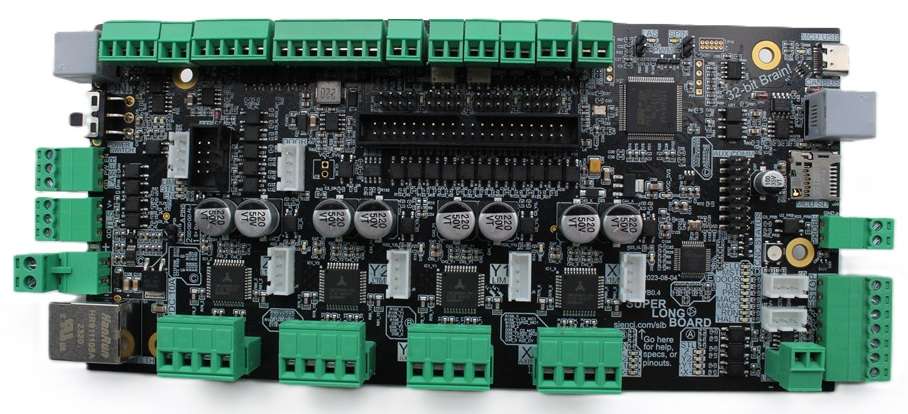
Ethernet has emerged as the more reliable alternative to USB communications and is something that is both supported by more modern controllers and something that the upcoming Super Longboard will support.

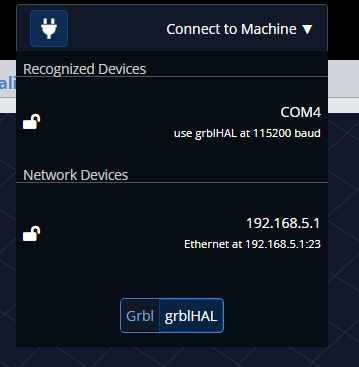
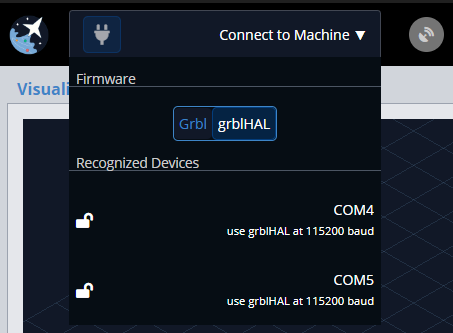
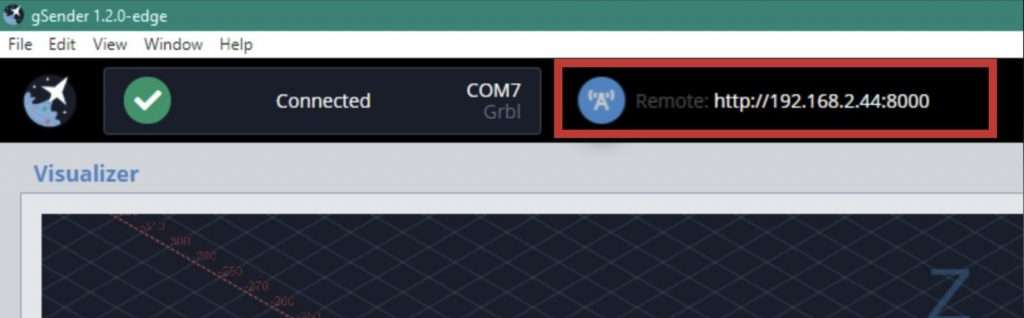
We’ve added our first iteration of sending over ethernet instead of USB to this latest Edge build. If the grblHAL controller is selected, you should see a new “Network Devices” option with a configured IP address.

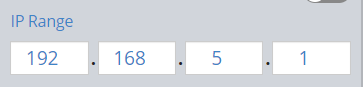
The IP address is configurable within preferences in the general tab.

For now, we’ve limited the functionality to TCP (port 23). We’ll be looking to expand it to work with websocket where supported in future releases.

Functionality should be similar as if sending over USB. We look forward to any feedback/issues experienced as we expand this functionality over the next few releases.

Gamepad Improvements

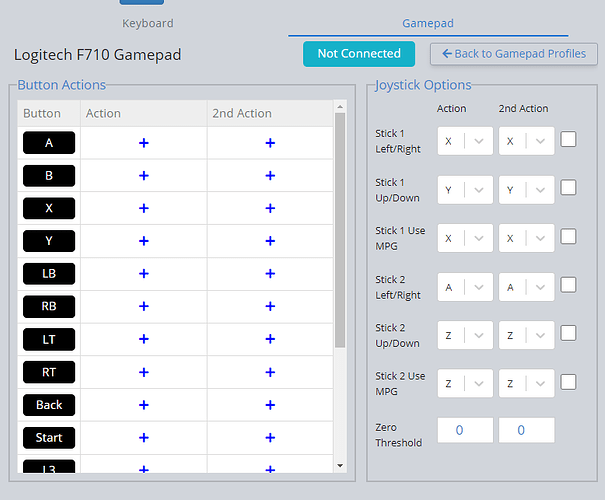
We’re slightly altering our approach to gamepad bindings, mapping available buttons as reported by the controller to actions instead of actions to buttons.

Each button can have a primary action and a secondary action by holding a modifier.

We’ve also added early iteration on joystick jogging and MPG mode jogging. Walid should have the details available for both soon.

We look forward to any feedback in this area since it will likely take a bit of iteration to get to our final implementation.

Full Notes:

General

  • Connect over Ethernet using grblHAL controller/boards. IP address configurable within connection preferences
    • Fixed connection routing on HAL – should now be faster connecting
    • Fixed HAL pin states not reporting correctly
    • Unlock button now available on the UI at all times
    • Fixed HAL startup routine to correctly parse alarm code if in alarm state rather than assuming homing
    • Added better error logging to quickly address issues
    • Clearer distinction between planned lines and cut lines in visualizer – configurable in custom visualizer theme
    • Moved firmware selector in connection widget to bottom
    • Fixed issue with bitfield input in firmware tool
    • File parsing simplified to only need to parse the file once across several tools (outline, start from line)
    • Fixed edge case where Outline function would never return

Gamepad

  • Restructure of gamepad logic
  • Actions are set based on buttons present on your gamepad
  • Button labels can be modified by hovering over them and typing in your desired label
  • New feature allows you to add a second action to a button which can be used by pressing and holding the set button to activate the secondary actions (similar to the modifier key on keyboards)
  • New feature: Lockout button. Used to activate/deactivate gamepad buttons when needed. To use this feature, you must assign it to a button of your choice, then press and hold the button for 4 seconds, then it will toggle between lock and unlock
  • Added section for adjusting joystick functionality. Can now map joystick directions to certain axis. Have the ability to reverse the direction of the axis movement as well by checking the box next to the option
  • Added MPG mode for joystick
  • Jogging using gamepad is now dynamic, speed of jog will depend on the amount of force put on the joystick itself, if you push it all the way to the end jogging will be at max speed
  • Added deadzone threshold option for joystick

As always, releases can be found on Github.

The Next Big Release for gSender Is Here! (1.2.0)

Hey everyone!

It’s time…

After over a year of testing, debugging, and iterating we are excited to share our biggest gSender update yet!

Several of the features being released today have been in development and testing for over a year, so a big Thank You to all of those that helped us test and offer your feedback and experiences. The entire Sienci Labs team has been hard at work refining, stabilizing and speeding things up in the background, and now everyone can share in all of the new and super cool features available.

Some Quick history

You might be wondering: “a year? really? Haven’t they been updating gSender continuously?” and yes you’re right we have been.

Many typical gSender users might not know this but while gSender HAS been getting continuous updates on average every month, we’d also ‘spun-off’ what you might call a gSender sibling that we call “gSender Edge” around a year ago. The purpose of gSender Edge was to answer the question of:

With now thousands of people using gSender, we didn’t want to risk the chances that a new feature or update could ruin everyone’s experience using their CNCs, so how do we work on these new features in a safer way?

Edge Lifecycle

Edge isn’t a replacement for gSender in any way – it’s a way for us to test and get feedback on new, bigger features without exposing them to users who may not be interested or causing unexpected bugs. This follows a cycle that can be several months long where:

  1. A new Edge version is split off from Main in order to prototype some new functionality and features (you can tell when this happens because the numbering scheme will jump up from 1.1.6 to EDGE-1.2.0, for example)
  2. Edge eventually stops adding major features so it can become more refined from user feedback and squashing bugs
  3. Once everything seems stable, everything that’s been added to Edge becomes a part of Main gSender so that everyone can now enjoy the new features
  4. The process repeats

We’re happy to announce that we’re now completing that cycle for the first time and flooding a whole lot of new features into gSender!

Get ready to see a whole lot of new features that this gSender update is bringing :smiley:

We’ve spent a huge time commitment just revamping the resources with about 24 new page-lengths being added to describe all the new features and better explain existing ones; that means expanding our existing documentation by about 40%!

By the way, this means that YES this new update will be including everything from Edge 1.2.5 plus more, it also means that soon enough the Rotary/HAL version will receive all these same updates and be released as the new version of gSender Edge. Edge will always be available for anyone to try and will always be ahead of gSender by having more features albeit likely less ‘stable’.

So let’s take a peek under the hood at some of the highlights to see what all the excitement is about!

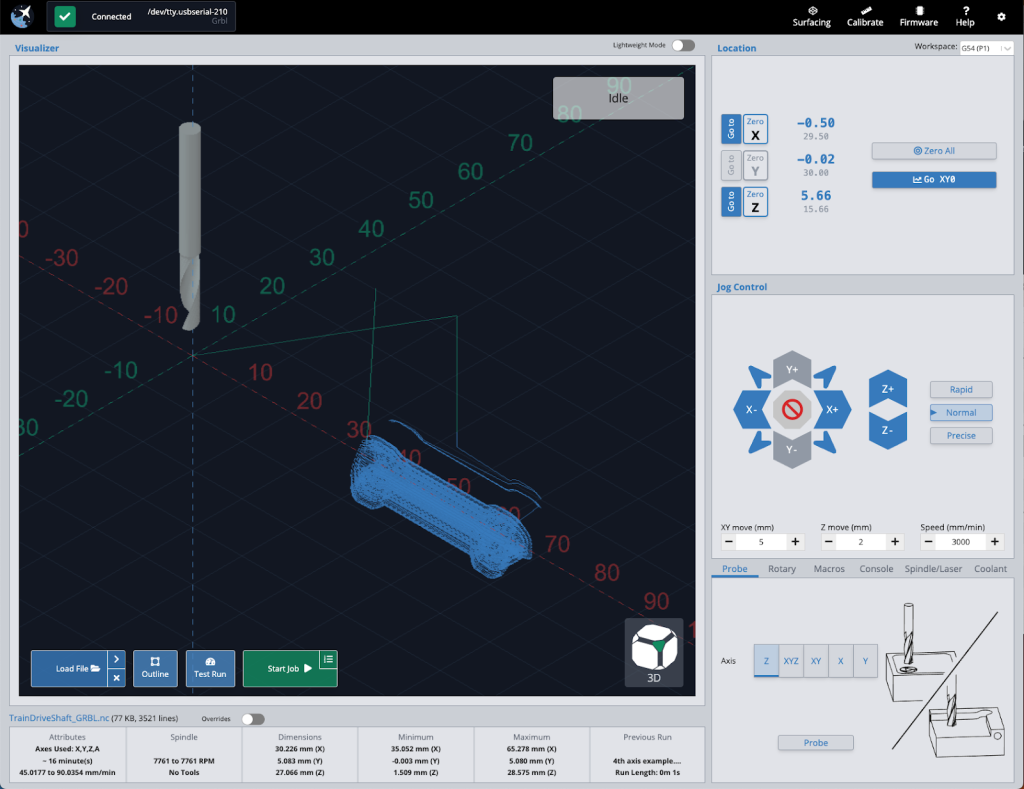
Faster and Lighter 

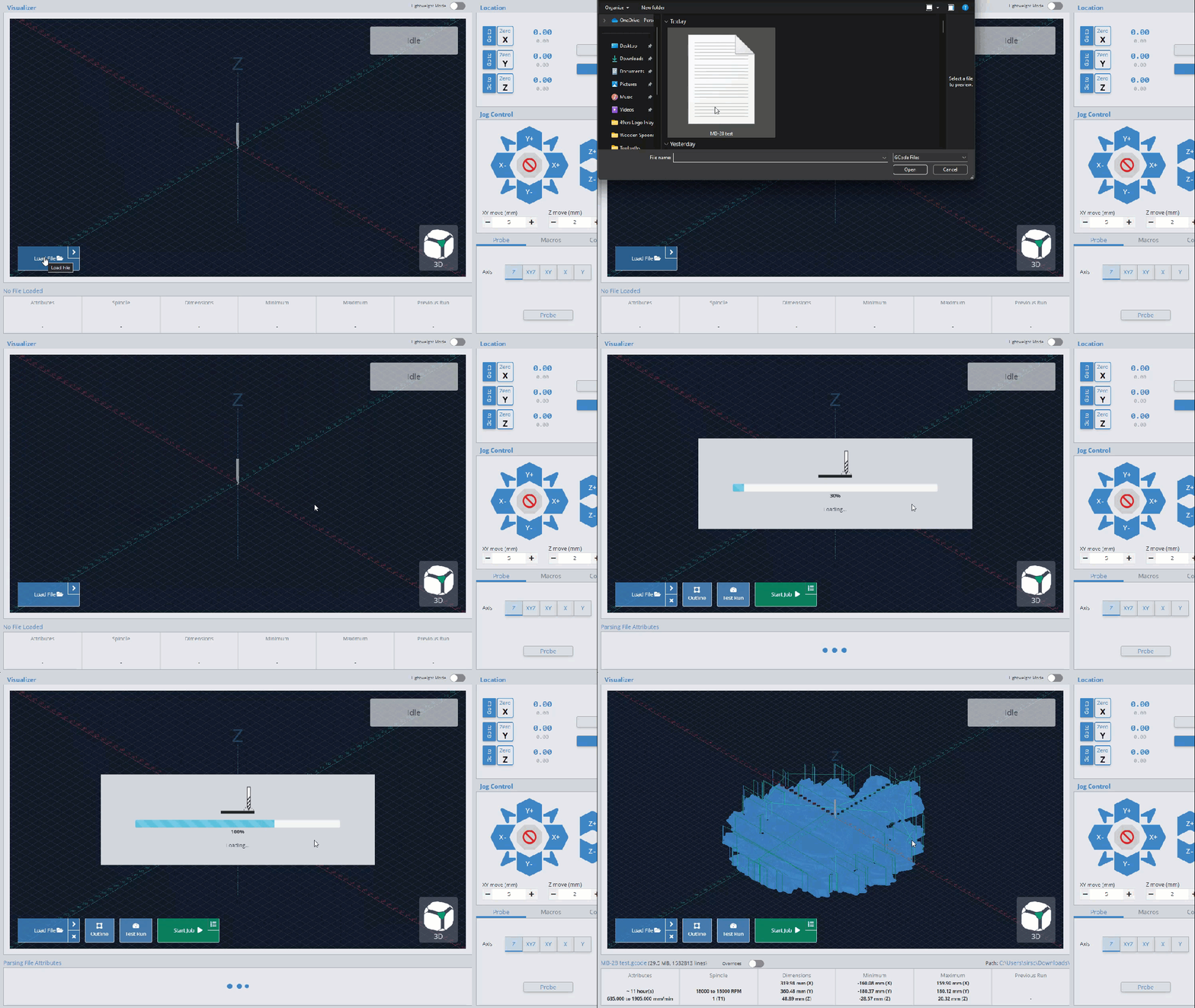
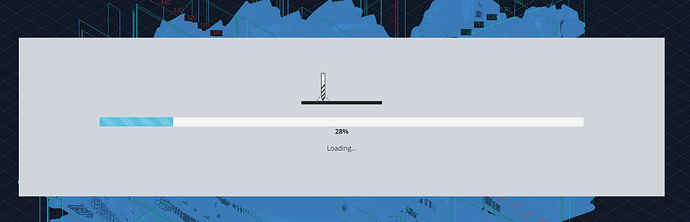
If you’ve ever found yourself waiting for a file to load, get ready to notice the speed increase! If your file still needs to load there’s even added in a fancy dancy new loading bar!

  • This was another big effort by our development team to speed things up under the hood and use less memory once files are loaded. There are multiple areas where on average files loaded 20% faster and gSender used 2/3rds less memory

Better protected against interrupted jobs 

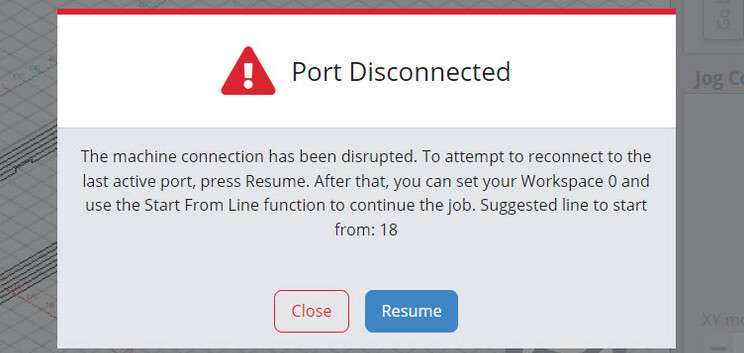
If you’ve ever experienced disconnecting during a job, you will quickly wonder “where was I just now?”.
We continue to have brainstorming sessions at the Lab to think of ways to help when problems like this occur and this is a new one we think will help.

  • In specific cases where the USB port disconnects while running a job, gSender will now be able to recognize the problem and alert you about it, suggesting to reconnect and providing a line to resume from using our ‘Start from line’ feature. This allows you to restart close to the same spot you stopped on, saving time and materials.

Tested Gamepads and Shortcut Printing 

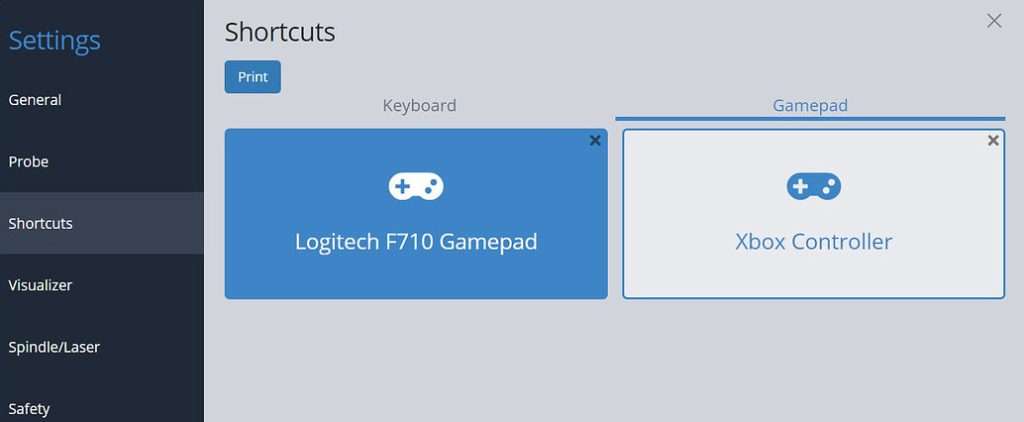
Keyboards are great, but gamepads are better! You’ve always been able to add your own gamepad profile to gSender but we’ve now done some of our own internal testing to validate some gamepads that we can recommend. With community help, we hope to continue growing this list of officially tested gamepads.

  • This shortlist of options are meant to be common, affordable, and easy to source. This currently includes: the YCCTeam Xbox controller and the Logitech F710. Now see that in gSender → Settings → Shortcuts → Gamepad you’ll find pre-made presets for these gamepads to easily load up and use.
  • Remember you can also now print a PDF of your personal keyboard or gamepad shortcuts for display in your workshop. They will quickly be committed to memory and you won’t be searching for that mouse any longer!

Set Lasers to Stun

A laser diode in harmony with a CNC router can be great because you can clamp the material to carve and then laser engrave afterwards and know that everything is still aligned. As a diode user, enjoy some of gSender’s new unique features to support them when you turn ‘Laser Mode’ on.

  • Turn on the laser at low power when running a job outline (enabled in the Spindle/Laser settings). This will help you to better see where your project is going to be located on the material
  • Automatically apply an offset from the router/spindle to the laser so all your g-code files stay aligned (configured in the Spindle/Laser settings)
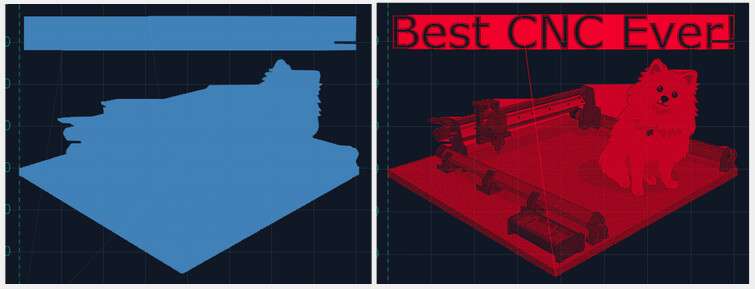
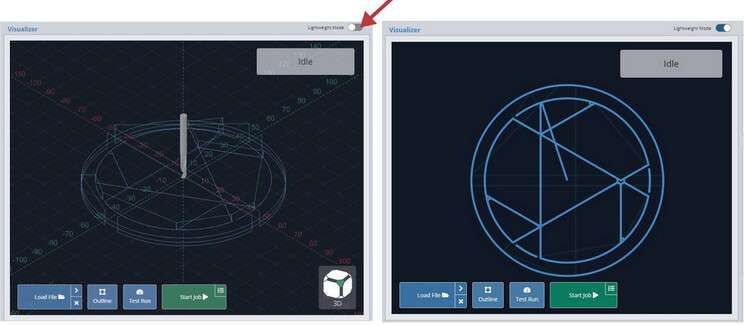
  • Switch to a specialized visualization designed to show raster engraving images better than typical g-code visualizers

Previous Visualization versus New Laser Visualizer

New Diagnostics Tab

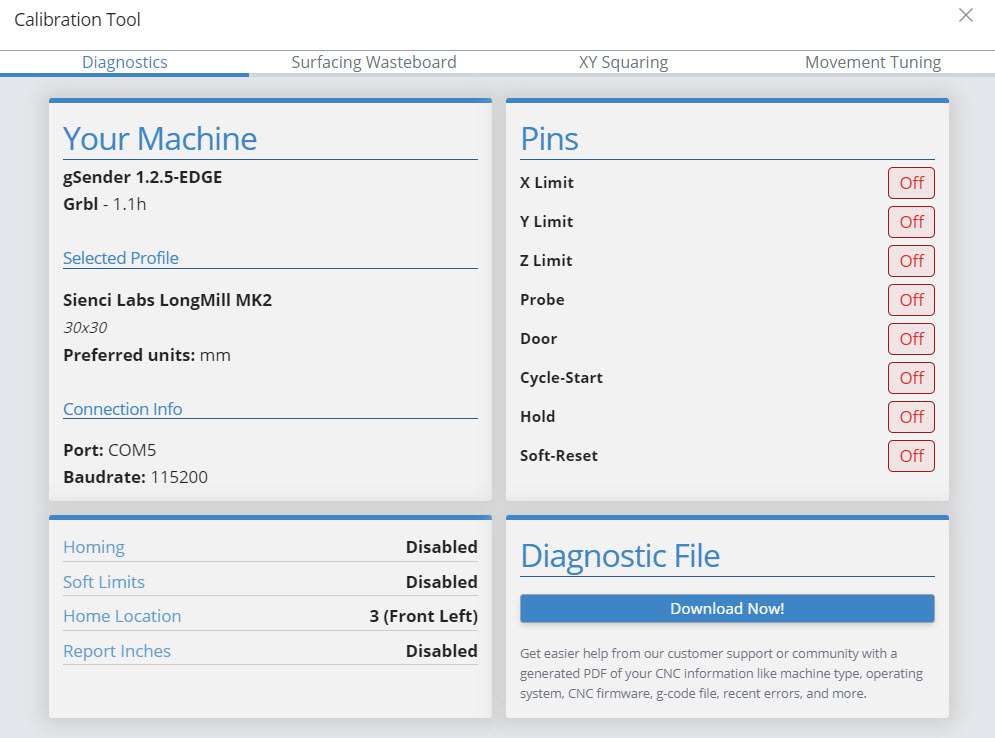
What’s up Doc? Now have a little bit more insight about your machine whether it’s testing limit switches, checking firmware or profiles, and now get all this information and more in a downloadable PDF for easy sharing!

  • Just click to ‘Download Now!’. This PDF file is meant to include information on your computer, your CNC, recent alarms / errors, any currently loaded g-code file, and more. It’s basically a treasure trove of information that you can share on community forums, Facebook groups, or with your CNC customer support; going a long way towards getting help from others on diagnosing CNC problems .

Remote Control 

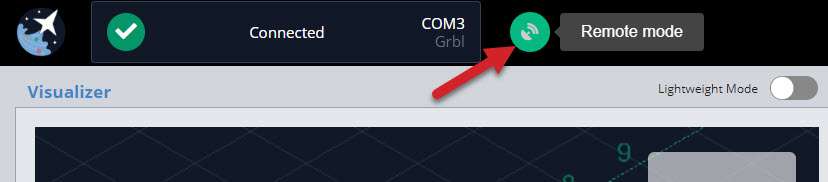
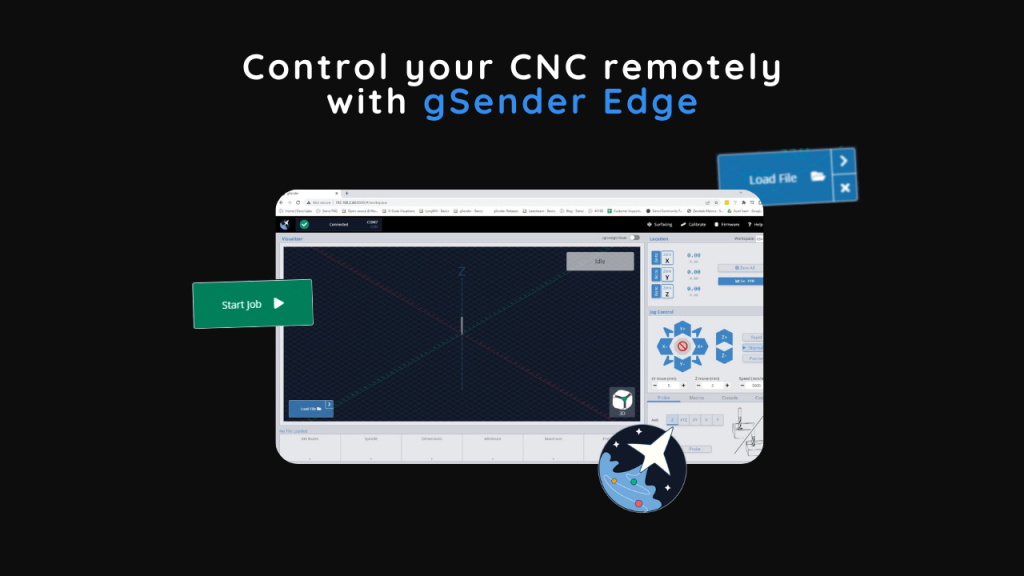
Look no hands! Remote mode is exactly how it sounds, giving you the ability to connect to any device running gSender from any other device on the same network through a web browser. You’ll be jogging and zeroing from your phone before you know it :slight_smile: This feature allows you to:
  • Load in a file from your design computer outside your shop then run it on your computer inside the shop
  • Use a tablet as the primary means of controlling your CNC rather than a mouse and keyboard
  • Use your phone to jog your machine around or run other functions
  • Leverage a mini PC or Raspberry Pi as the inline (tethered) computer for cheap, fanless, and reliable operation with less effort to have a display, keyboard, and mouse

New Tool Change Support and Wizards

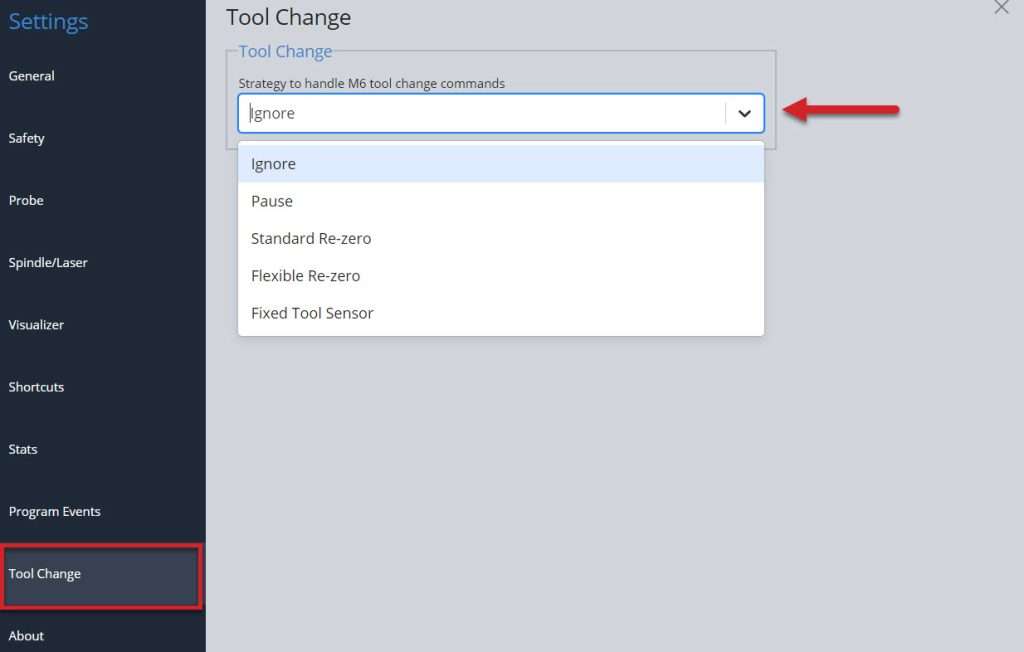
Isn’t it nice when someone offers to help out? We’ve hired a wizard to assist! Having options for doing some of the repetitive processes sure makes the job easier and decreases the chances of human error. Expanding on the initial options of tool changes, we’ve added new wizards that walk you through using the ‘paper method’, a touch plate, or using a tool length sensor for single file, multi-tool jobs.

  • Remember that all these new features have further reading can find in the gSender Resources! Learn about the 5 revised tool changing options, what they do, and which one would best suit you.

Anonymous Information

Completely optional, completely anonymized, can be turned off anytime, only works on internet-connected devices. More and more we’re finding it would be helpful if we knew certain features are widely used or certain errors are constantly encountered to understand how we can improve the gSender or its documentation. Remember gSender’s code is open-source and viewable by anyone so we don’t have anything to hide, so if you’re fine with us knowing things like the CNC profile you use, the computer you run gSender on, and other ways that you use the app then you can decide what you prefer for this particular setting :slight_smile:

Some other assorted features include:

  • Slider overrides for easier feed rate and spindle / laser adjustment on the fly
  • Ability to toggle between job overrides and file attributes before starting a job to fine-tune feed and speed overrides before starting a job (Using gSender – gSender Docs)
  • Get a top-down snapshot image of your job with the new SVG Visualizer that bridges the gap between a fully disabled visualizer or the full 3D one (useful for less powerful computers) (Additional Features – gSender Docs)
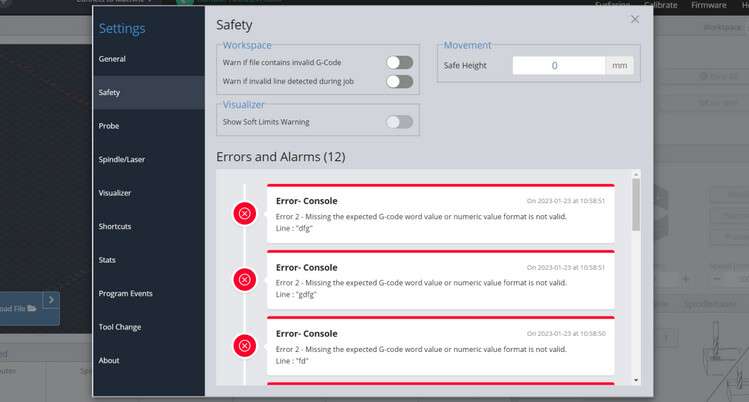
  • New safety tab for tracking alarms and errors and accessing safety settings
  • Soft limit warning on file load if machine has limit switches (Using gSender – gSender Docs)

Conclusions and Downloads

We hope you all enjoy everything new that’s been brought to gSender! We still have so many ideas that are in progress that either iterates on what’s just been release or brings even more new features to the table. If you’re already an Edge user, feel free to use this until the next Edge release comes out shortly where we’re working on supporting the new HAL firmware and Rotary axes

Remember that though the team has been working hard to make this a stable release and squash all of the bugs over the past 12+ months, we can’t guarantee that there won’t be the odd issue that needs to be addressed. Please let us know right away if you have any concerns or have found a new bug and our team will move quickly on it.

Many congratulations to the whole team that’s worked so hard to get to this point including the whole software development team of Kevin, Walid, and more, and to Jay and a new join Stephen for helping me with bringing all the new documentation up-to-date, as well as many other people behind the scenes!

@StephenCampbell actually also helped me to compile all this information together for this post and he wanted to add some words:

P.S. – I’m a new Sienci Labs team member! You may see me here in our community or helping out on the support side of things. I’ve been busy updating all of the documentation for this new update, check it out at Installation – gSender Docs 3 for more information on gSender. I’d love to hear your feedback!

And with that… find the link here (Release v1.2.0 · Sienci-Labs/gsender · GitHub 12) to get the latest version of gSender or go to the main gSender download page:

Note: due to the large amount of changes from 1.1.7 to 1.2.0, we weren’t able to get the typical auto-updater to won’t so you’ll need to install the new version manually. This also goes for people with Edge installed that want to download 1.2.0

Cheers everyone!
Chris

Full Notes on the new Version:

  • gSender runs noticeably faster and lighter!
    • There were multiple areas where we were able to make file processing on average 20% more efficient and reduce overall program memory usage by an average of 2/3rds due to an increased node sandbox memory size and improvements to multiple run times
    • On files that still take a while to load we’ve now added a loading bar window to show file loading progress
  • Added new job recovery functionality
    • In specific instances where your machine’s USB port disconnects from gSender during a job it’ll be able to recommend where you should restart from
  • Updates to gamepad controller support
    • List of officially tested controllers if you’d like to select a gamepad that works more reliably with gSender
    • Tested controllers come with their own pre-loaded presets
    • Improved UI for creating controller profiles
    • Available PDF printout of shortcuts to hang up near your machine
  • Better support for Laser Diodes
    • Optional low-power laser enable on outlining
    • Laser-specific visualization: there’s a different style when laser mode is on and that colour can be customized
    • Laser offset now allows for negative offset values
  • New Diagnostic tab inside the Calibrate Tool
    • See at-a-glance information on whether your limit switches, touch probe, or other pins are activated
    • General summary on your CNCs firmware settings
    • The ability to generate a Diagnostic PDF file that includes information on your computer, CNC, recent alarms / errors, any currently loaded g-code file, and more! Very handy to share with our support team or other CNCers to help diagnose problems your CNC might be experiencing
  • Remote Mode, control your CNC remotely!
    • Connect to your CNC from a myriad of other internet-connected devices for loading files from other computers or jogging and zeroing from your phone
    • Easy to set up and configure
  • Tool changing is now more fully supported by our new Wizard
    • gSender already recognized M0 and M6 commands to initialize a pause in the middle of a file
    • New processes to support using the ‘paper method’, a touch plate, or a tool length sensor (choose based on your CNC setup) now allow more flexibility in handling tool changing and in some cases can pop up a Wizard to direct you through each step and without the need for custom macros
  • Other assorted features
    • Optional Anonymous Information gathering
    • Slider overrides for easier feed rate and spindle / laser adjustment on the fly
    • Ability to toggle between job overrides and file attributes before starting a job to fine-tune feed and speed overrides before starting a job
    • Get a top-down snapshot image of your job with the new SVG Visualizer that bridges the gap between a fully disabled visualizer or the full 3D one (useful for less powerful computers)
    • Colour coded Console on certain commands like alarms and errors that can also now pop-out
  • Assorted other settings
    • New safety tab for tracking alarms and errors and accessing safety settings
    • Soft limit warning on file load if machine has limit switches
    • Customizable probe fail distance in Z
    • More visualization theme customizations for ‘light’, ‘dark’, or your own fully custom design
    • New Shortcuts for controlling Probing, Visualization, and Macros and the ability to filter shortcuts by category to easily find and edit them
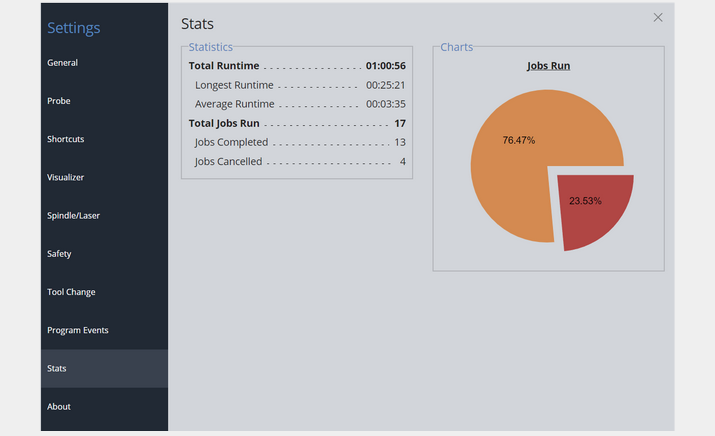
    • New stats tab for tracking jobs run on your CNC
    • Custom decimal places on the DRO
  • and other bug fixes for Linux auto updates, Settings exporting, Preferred units and file unit modals, Bounding box relative movement, Shortcut printing and more!

gSender Edge 1.2.5 Release

Hey folks,

We’re at the point in EDGEs life where we’re mostly focused on improvements to performance and hunting down any remaining bugs. This version is largely that – going through our backlog of reported issues and making sure they’re handled.

That said, I’d like to highlight specifically some major improvements to file parsing/loading and visualization – we’re seeing 200-400% faster parsing and about 2/3rds less memory usage on some larger files. We also (finally) have a progress indicator when handling larger files.

As always, thanks to everyone who has reported issues or given feedback on EDGE – we’ll continue to work through our backlog, and are excited to release it to the general public.

  • New File Loading indicator that also includes progress
  • Significant improvements to file parsing to increase speed and reduce memory usage on large files
  • Fixed issue with laser offset and differing preferred units and file unit modals
  • Altered connection workflow to be more forgiving for non-standard startup messages
  • Fixed bug with feedrate unit conversion parsed from file
  • Fixed issue with reported bounding box not handling relative movements correctly
  • Fixed bug with feed override shortcuts
  • Firmware flashing modal now only shows Sienci profiles for flashing
  • Shortcut improvements to help consistency with migrations from version to version
  • Shortcut printing now works again
  • Dependency upgrades

gSender – Hal + Rotary support Early Alpha

We’re super happy with how gSender has been adopted by the hobby CNC community since it’s original release. We’re continuing to grow both new users and new features and are working to create a product that meets everyone’s needs.

Part of that growth is reaching out to newer portions of the greater CNC community. As such, we’ve begun steps towards supporting two new areas – alternative firmware, and rotary addons.

The first such firmware is grblHAL. We chose this firmware for a few reasons – it’s similar enough to GRBL to be a good first addition, and we’ve identified it as a strong candidate for the updated LongBoard controller releasing later this year.

Rotary and 4-axis is also something we’ve been repeatedly asked to support. This is also an area we’re looking at developing our own version of, and have taken some preliminary steps at how we’re going to support it at a software level. We’ve taken steps at supporting files with A-axis commands for both Grbl and grblHAL firmware flavours.

Please note that this is an exceptionally early release – we really want to get this out there to start gathering feedback as soon as possible. A number of functionalities may or may not work unexpectedly with your hardware. This is our first time branching outside of supporting specifically our machines, so there will be some growing pains as we fine tune the new firmware support.

grblHal Support

Choosing your firmware flavour should be as simple as selecting whether you want to use GRBL or grblHAL before connecting.

This is a MVP which includes all expected common functionality (visualization, sending, jogging, DRO, MDI, probing etc.), surfacing, calibration and firmware (minus flashing), macros, laser and (now) Rotary.

Functionality and ease-of-use should be the same experience regardless of what firmware flavour you’re using – all HAL specific functionality are handled behind the scenes so you can continue to interact with the program as you’re used to. Try connecting, loading jobs, jogging, probing, checking out our Firmware tool and other surfacing etc. tool interfaces and anything else you’d typically do on your grblHAL enabled CNC machine.

We’re going to continue to work on further support for HAL specific functionality, along with clean up any rough edges moving forward. Look forward to network connection, flashing, and cleaner toolchanges coming in future releases.

Primarily, this build has been tested on the Flexi-HAL CNC controller in collaboration with Andrew from Expatria Technologies.

Rotary Support

Full rotary support is on its way to gSender soon, you will now be able to run your files that have A-axis movements with ease. We are still working on improving rotary for gSender, you may see some features that don’t quite do anything as we plan on working on them and adjusting a several things in the coming weeks. We do have a few great features that we would like you to try out though:

Visualization

The visualizer in gSender will now be able to visualize A-axis movements for users to see, in addition, we decided to add an object that represents the stock material, which rotates accordingly during a job. We also updated the outline feature to work with rotary files more correctly for those who need to use it with rotary. We plan to refine the visualization in the coming weeks to improve it further.

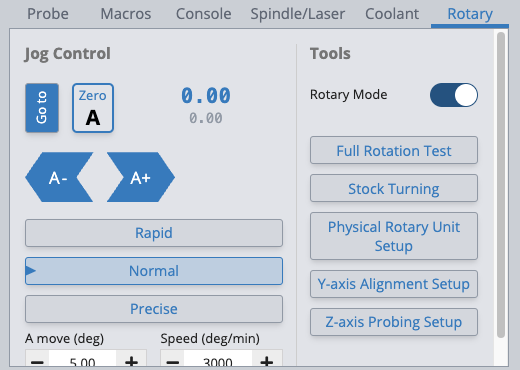
Rotary Mode

Since GRBL does not support the rotary axis, we decided to get creative and come up with a good workaround. We have implemented a feature named “Rotary Mode” where some firmware values are adjusted to mimic the A-axis movement behaviour. You will be able to load 2+1 axes files that utilize the A-axis. You will notice that the Y-axis is disabled in this mode as the A-axis takes its place during a job and the fact that the Y-axis cannot be used when the A-axis is being used, so it is disabled in the app until you Rotary mode. This feature is meant for Grbl machines specifically.

A-axis Support

A-axis movements are not handled on machines running Grbl , so we found a way to mimic the behaviour in gSender and allow users to run files that have the A-axis. gSender will interpret A-axis movements as Y-axis movements now, this pairs with the rotary mode feature that helps us achieve this. This behaviour only applies to GRBL to allow the app to read A-axis movements correctly.

A-axis Control and Display

You can also control and see the position of the A-axis from gSender. A-axis control works just like all other axes, you have access to jog control buttons on the user interface, as well as the shortcuts on your keyboard or gamepad. The A-axis position readout is available and again works the same as the other axes, you have the ability to zero or go to the zero position, and update the position manually via the position input. Once we’re satisfied that all this functionality is working as expected and no other requests are made for features we’ve forgotten, the plan will be to refine the look and location of these buttons so that they can be implemented more seamlessly into gSender’s existing interface

Download

Note: this is not an EDGE build, it contains completely new functionality aimed at grblHal/rotary users. EDGE will continue to receive updates independently while we continue to move it towards a new, Main release in the coming weeks. Once we’re satisfied with how progress is continuing with the HAL and Rotary support version and Edge is looking relatively bug-free, then Edge will become the new Main and HAL/Rotary will become the new Edge. To make this happen, we’d greatly appreciate and and all feedback you can provide

You can find the binaries for Hal/Rotary on Github.

How you can help

Use it! Please try to keep feedback to this single topic thread so that we can more easily distinguish comments that are HAL/rotary specific – we want to avoid the headache of trying to sort feedback between Main, Edge, and Hal/Rot. Any feedback in this thread about functionality either not working or not working as expected will be taken into account. As always, keep in mind this is a very preliminary release, so if you’re especially attached to your work process, bits, or expensive materials then feel free to stay away until the product is more fleshed out.

gSender 1.1.6 Release

Hey folks,

New gSender release with a number of feature improvements and fixes.

Two big ones we’d like to highlight:

Surfacing Tool Changes

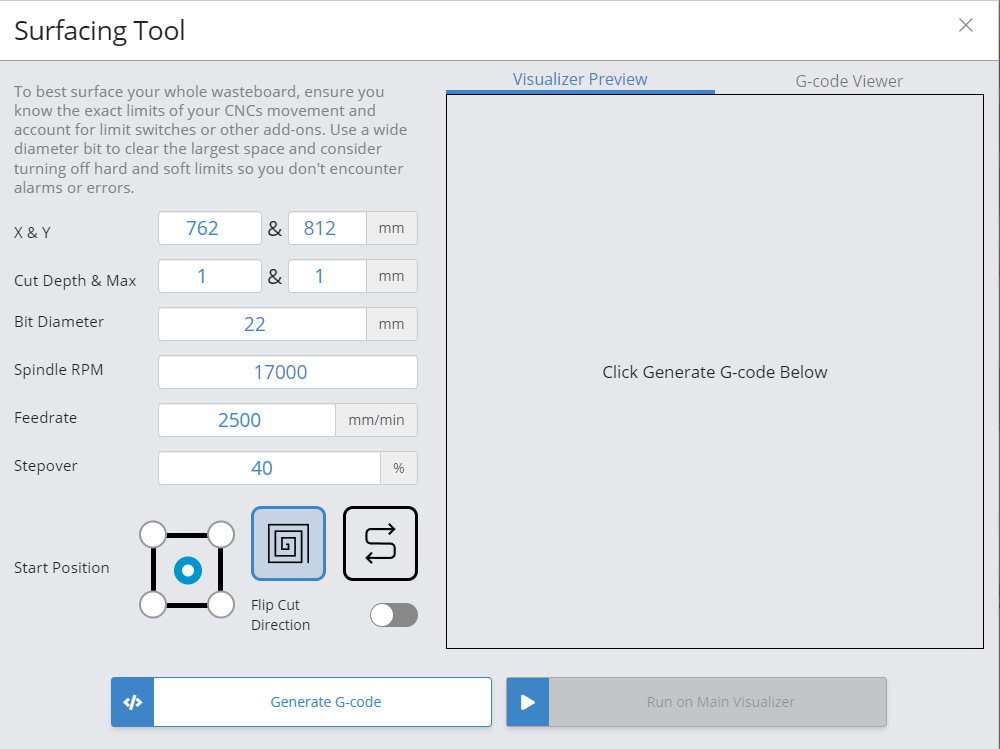
The surfacing tool has been slightly redesigned and comes with some new features.

Some feature improvement highlights include:

  • The cutting tool now ramps into position on all generated toolpaths instead of plunging in
  • Can now start from center
  • Easy to flip direction of cutting
  • Easy copy-to-clipboard to save generated toolpaths for later
  • Number of generative issues that could leave unfinished passes

Visualizer improvements

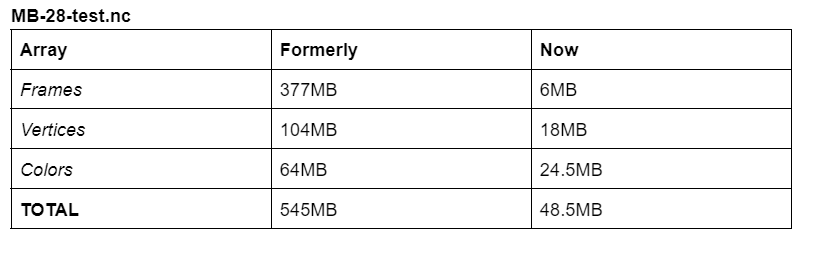
We’ve rewritten how the visualizer generates and displays toolpaths to result in lower memory usage after parsing. This should be particularly noticeable with larger files – gSender is using less memory by a relatively large factor when visualization is enabled.

As an example, for a 28 megabyte gcode file (~1.5 million lines), these are some comparisons of what the memory values were previously and what they are now:

You should also notice slightly faster visualization due to these changes.

Our benchmarking and profiling has also identified some issues with the library we’re using to parse the toolpaths themselves using excessive amounts of memory. This will be addressed in an upcoming release. We have a relatively long list of performance improvements we plan to address over the next few builds to make sure gSender runs well on lower-hardware spec devices, and this is the first part of that.

Release Notes:

  • Improved surfacing tool – pattern now ramps in to support more surfacing bit types, cut direction is reversible, able to start from center, can copy gcode to clipboard for saving.
  • Major improvements to visualizer memory usage and parsing speed
  • Start from line should account for maximum file Z height when moving into position to account for situations where Z0 is set at the spoilboard.
  • Probe code should always return to exact starting location instead of approximating it.
  • Improvements to firmware flashing UX – can now select profile and port inside tool.
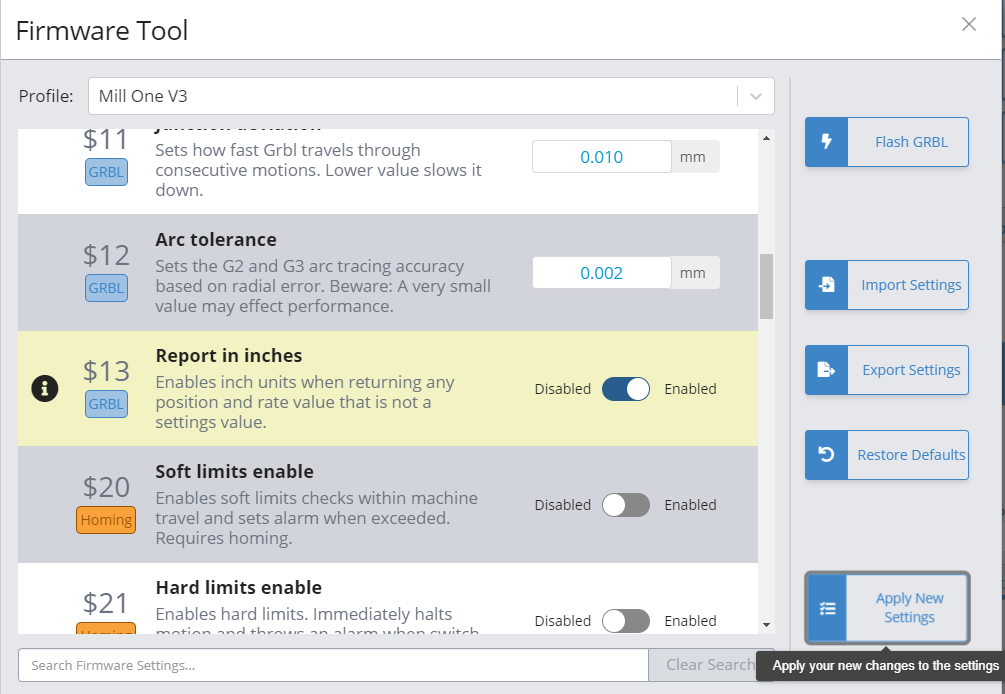
  • Fix for auto-probe code movements being too small when “$13 report as inches” EEPROM value enabled
  • Go To buttons only use safe height if below that position when limit switches enabled to avoid moving downwards.
  • Fixed values in some machine profiles.
  • Added machine state guards to some keyboard shortcuts.
  • UI Modals now more difficult to close accidentally.
  • Bracket Comments on M0/M1 now emitted to UI.
  • Laser offsets preferences allow negative values again
  • Bounding Box variables once again available to macros
  • Mac version now exits completely on close.
  • Higher UI clarity when connecting to board with invalid/unrecognizable firmware
  • Styling changes in Firmware Tool
  • Fixed overflow when OS had screen zoom above 100%.

(Pi build coming in the morning)

“Remote Control/Headless” Feature in gSender Edge

Hi everyone. If you’re a more adventurous CNC user, did you know that our experimental version of gSender includes a powerful Remote Control feature (sometimes referred to as headless) that can enable new functionality of your CNC within your shop?

You can load in a file from your design computer outside your shop and then run it on your computer inside the shop, use a tablet to control your CNC rather than a mouse and keyboard, use a phone for jogging or running functions, or leverage a mini PC or Raspberry Pi as the tethered computer for cheap, fanless, and reliable operation without taxing them with a display, keyboard, and mouse.

This feature is new so don’t expect it to be perfect, but try it out and give us feedback if you find anything we can do to improve it. Be sure you don’t use this feature to run your CNC remotely, we discourage unsafe use of the CNC including leaving it running unattended.

Follow our guide below to learn how to set up Remote Control using gSender Edge.

While you’re using Edge, try out and give us feedback on some of its other new features as well such as visualizing laser raster files, laser job outline, custom visualizer colours, and the ability to create a print of all your custom gSender keyboard shortcuts onto a piece of paper that you can hang up next to your machine. These features are easy to find and are also further explained on our release forum post here: https://forum.sienci.com/t/gsender-edge-headless-support-better-laser-support-custom-visualization-and-more/6291

gSender 1.1.3 Release

Hey folks. gSender 1.1.3 has been released with firmware tool improvements, input improvements, and bug fixes/feature improvements!

The firmware tool has a new look – settings different than the default for your selected machine profile are highlighted, you can easily look up settings by term rather than number, and machine profile is now located inside the tool instead of in preferences. We’ve also added some new machine profiles for Longmills with extension kits and some other machines.

Machine profile selection has been removed from preferences entirely. The purpose of machine profiles has been gradually lessened over each release, and the only part of the program it was still informing was the firmware tool. Due to this, we’ve removed it from preferences as a selection since it’s purpose was confusing a number of users, especially when it came to machine dimensions (which were actually pulled from EEPROM). Machine profile is now selected in the firmware tool, and only handles which image to flash/settings to use as default values.

We also have a number of feature improvements, including: UI inputs also no longer default to minimum value if the user takes longer than expected to type, Test File mode now restores WCS upon completion, and continuous jogging working more consistently when $13 (report in inches) is enabled.


Patch Notes

  • Added profiles for Longmill extension kits
  • Machine profile removed from preferences and placed in firmware tool
  • Fixed incorrect default values in some machine profiles
  • Test mode now restores WCS after the soft reset performed while exiting check mode.
  • Fixed issue with test mode that would occasionally have it start running the file after test was complete
  • Fixed issue with continuous jog when soft limits were enabled and report in inches EEPROM value was enabled
  • Firmware tool improvements – new convenient profile selection, setting search, performance improvements, highlighted changed values
  • Improvements to value inputs – should no longer default to min value if there is too long a pause in typing
  • Surfacing labels changed to X/Y rather than length/width
  • Minor styling changes

gSender 1.1.3 Assets: Release 1.1.3 · Sienci-Labs/gsender 8

gSender 1.0 is now here. Simple and powerful control of GRBL CNCs.

Hi everyone, Chris here.

It’s not often I post here, most often it’s Andy or Kelly keeping y’all up to date on the status of things happening here at Sienci Labs Headquarters; I’m much more behind-the-scenes. Today I’ve come out of the woodwork for a very exciting and momentous announcement for us, the release of gSender 1.0.

Since much of gSenders development hasn’t made much of an appearance on the company blog, let me bring you up to speed on where this project started and what the release to 1.0 now means:

Origin

Back in 2016 when Andy and I first started Sienci Labs around our Mill One CNC, the range of free and paid g-code senders specific to operating hobby CNCs was surprising wide. Options like UGS and Candle were quite widely used and more were in active development at the time such as UGSPlatform, CNCjs, bCNC, and more. We were able to make a wide range of recommendations to our CNC users as well as made documentation around specifically UGS at the time since we felt it was the most intuitive to use.

Jumping to 2020 we’ve now got more machines in the wild then ever before. If you’re familiar with working at scale, you know that a 5% failure rate, for example, is very manageable when you’re working in the hundreds but starts to be more of a headache in the thousands. This is what we were starting to encounter with the g-code senders available at the time. And I’ll clarify, when I say “failure rate” this isn’t me saying that the software didn’t work. There were outlying bugs, quirks, and stable versions that were more stable than others; but what also stuck out was that many of the available options were made for more technically savvy people.

What were our options?

With more and more calls coming in, we could tell our users were getting confused with existing sender options. We heard questions about basic functions, confusion about behaviour, and one of the hardest things for us to hear was that our users were blaming the functionality and abilities of our CNCs in cases where we knew it was coming down to the sender. I remember personally dealing with situations of broken bits because of probing operations, or even a time I remember vividly where I helped someone out for a whole hour over the phone because he thought his file was visualizing correctly and we found that he’d just accidentally closed the visualization window within the sender.

I want to make it clear that I have the utmost respect and thanks for all those who took the time to make their own g-code senders for hobby use. These contributors to the hobby CNC community as a whole have taken the time to take what would otherwise be a personal project and have released it for the world to use. Not only that, but they continue to support updates, bug fixes, new features, and much more – all on their own time and out of the passion that they themselves have for CNC. But ultimately, the origin of these projects is what made me realize around that time that the goals of these open-source projects were never going to meet the goals that Andy and I have always had for the company: to make CNC routing fully accessible to the public. As long as open-source developers were at the helm, customization and a diverse range of features would take priority over UI design, streamlined use, and catering towards beginners by using more understandable language.

This left us with two options. Either we help fund an existing project or put more man-power toward it and get it moving in the direction we felt would be best for the next generation of g-code sender, or we begin making our own. I sent some emails around, and spoke with some other developers I knew and the consensus was that we’d go with the latter. Seeing as these projects were the ‘babies’ of each respective group of open-source developers, we felt it wouldn’t be our place to ask for more from people who wanted to do development on their own schedule, or try to push our vision onto others. Thus gSender was begun.

Goals and Principals of gSender

Starting ideation in October 2020, we began testing existing senders and outlined our core goals and design principals that we felt would guide development:

Goals

  • Act as new default machine interface / sender for LongMill customers (this means including all the functions and features that users are already used to from there existing sending options)
  • Supercharge our customers’ experience with their LongMill by streamlining / simplifying machine interaction and making even more machine operations easily available (a.k.a. nice-to-haves)
  • Keep design open for use by other hobby CNCers to provide benefit outside of just our own community (this means leaving some wiggle room for broader customization and adaptability to other CNC machines on the market as well as even further advanced features)

Principals

  • If it’s set once it doesn’t need to be visible 100% of the time
  • Options most users don’t need should not be obvious or take up much screen real estate
  • Most actions should be 1 click
  • “Someone off the street should be able to figure out how to get started”
  • Order of widgets should be close to order of operations/steps to proceed
  • Machine state should be obvious at a glance
  • Use colour patterns to subconsciously communicate button functions
  • Substitute CNC jargon with simple language when possible

We knew the other primary holes we wanted to fill roughly included:

  • Easy interface for beginners yet advanced features available for more experienced hobbyists
  • Smart handling of error cases, probing, jogging, firmware editing, machine connection, etc.
  • Built-in tools for convenient CNC management: stock/wasteboard flattening, motor calibration, machine squaring, etc.
  • Extensive keymapping and built-in joystick compatibility
  • Support of tool changing, start/stop g-code, macros, coding variables

The idea was to branch off of the well-known and provably reliable open-source codebase so we could be confident that we were starting with a good foundation to build off of. We also wanted the software to be made available easily for all systems so that future implementations could support standalone machines. After a wide range of tests performed over many weeks, CNCjs’ codebase was chosen for the previous reasons and because testing showed reliable operation on a variety of computer systems.

Present Day Release

I’m very excited to announce that gSender 1.0 is now available for free to anyone who wants it!

After nearly a year in development, the first couple months being in Alpha and the remaining ones being in BETA, we’ve now become confident enough to declare our first reliable version. We’re really excited to see more people begin to use it as we’ve now got a whole swath of great features and about 2000 users using it to run jobs every day.

Some things that you can expect from gSender in its current state:

  • Reliability of operation
  • Accommodates a wide range of computing systems via its ‘Lightweight mode’
  • Easy to understand and use due to its interface layout
  • Takes care of a lot of complexities behind the scenes, making mistakes and errors less likely and easier to deal with when they do happen
  • Built-in tools for surfacing, machine calibration, firmware editing
  • Ability to ‘start from line’, tool change, run custom macros, quick-travel with limit switches, and much more

If you’d like to learn more, we’ve got a primary download page, a documentation area, our full Github page, a discussion forum, and even though we’ve reached 1.0 we’ll still be releasing new dev builds for the foreseeable future as we continue development on gSender:

Download here: https://sienci.com/gsender/
Documentation: https://resources.sienci.com/view/gsender/
Github: https://github.com/Sienci-Labs/gsender
Forum: https://forum.sienci.com/c/gsender/
Feedback: https://sienci.com/gsender-feedback/

The team and I are very excited that we’ve reached this point. We set out to make our very own open-source and FREE g-code sender after gaining inspiration from some of the other commonly available options and we feel we’ve made a strong start towards those goals. To get here we owe a huge amount of thanks to our original 10 Alpha testers (you know who you are 😉 ), all those who participated in BETA testing and sending us suggestions and feedback, and importantly our greatest thanks to Will Winder and Cheton Wu for driving the UGS and CNCjs projects that not only were there for our initial users but also acted as a indispensable step towards us embarking on this project ourselves.

We want gSender to be the next-level open-source sender that’s available for all green CNCers to turn to whether they own a LongMill or otherwise: guided and easy to approach as a beginner yet customizable and feature-rich for higher-tier hobby CNCers. This means that it not only works for our Mill One and LongMill CNCs, but has already been proven to work on other machines like X-Carve, Shapeoko, Bob’s CNC, 3018, PROVer, and many more!

If you’re interested, the full list of features up to this point is as follows 😀 :

  • GRBL controllers supported
  • Smart machine connection
  • 3-axis digital readout (DRO) with manual value entry
  • All-directional jogging with XY diagonals, jog presets, and incremental/continuous single-button handling
  • Zero-setting and gotos (independent and combined)
  • Probing in any direction plus safe continuity detection ensures no broken cutting tools
  • Full imperial/metric compatibility
  • Responsive screen design and workspace customizations including visualizer light and dark theme
  • 3D toolpath visualization (no machine connection required)
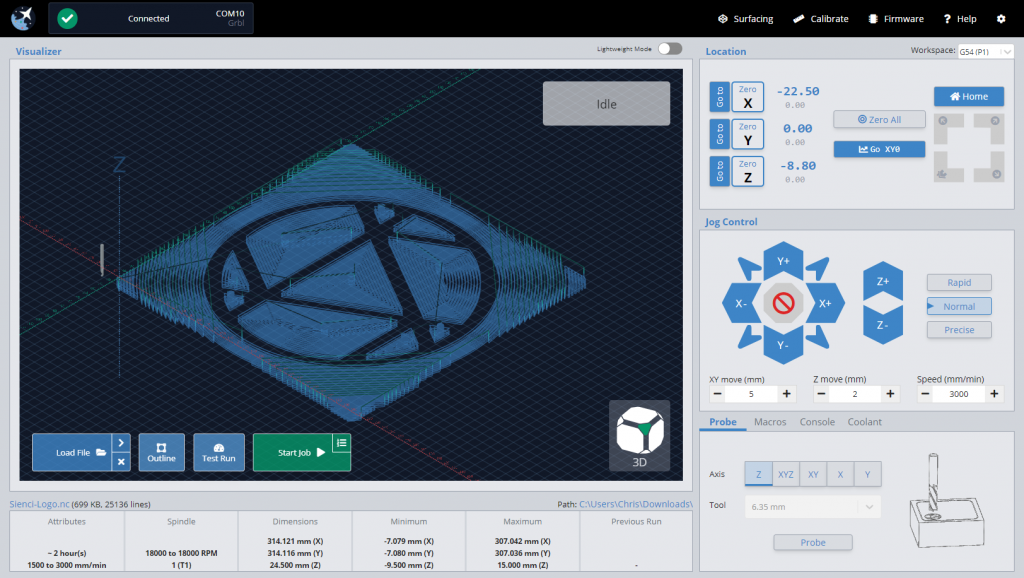
  • File insight on load (feed range, spindle range, tools used, estimated cutting time, and overall, max, and min dimensions)
  • Feed override and active job status indicators
  • Fully exposed keyboard shortcuts for external keyboard/keypad control
  • Joystick support built-in for a variety of controllers
  • Safe height movements – accommodates machines with or without endstops
  • Homing cycle and quick-movement locations available for machines with homing hardware
  • Full spindle/laser support via manual control widgets, active alerting, and live overrides
  • Full mist/flood coolant support via manual control widgets and active alerting
  • Macros buttons (rearrangeable) with enhanced macro variables and individually assignable keyboard shortcuts
  • Lightweight mode reduces processing intensity on less powerful hardware or when running larger files
  • Easy workspace swapping for more advanced jigging or alignment work
  • Optional automatic handling for common error throwing g-code
  • Firmware tool for easier GRBL EEPROM changes, loading defaults, and GRBL flashing
  • Surfacing tool auto-generates surfacing g-code based on machine cutting area and other preferences, ready to execute
  • Calibration tool for axis alignment – a step by step process to make sure your CNC is square
  • Movement tuning tool for calibrating motor axis movements
  • Tool change functionality – pause, ignore, or run code blocks on M6 commands
  • Start-from-line functionality to resume jobs part-way through in case of failure of abort
  • Outline functionality indicates the rough bounds of the job before cutting
  • Customizable g-code injection at job start & end
  • Tooltips for data entry points
  • Alarm warning explanations to better contextualize CNC errors
  • Sleep management to keep PC awake during g-code sending
  • Pre-built machine profiles, including: LongMill
    • Shapeoko
    • X-carve
    • OpenBuilds CNCs
    • 3018 CNC & PROVer
    • BobsCNC CNCs
    • CNC4Newbie CNCs
    • Mill Right CNCs
    • Ooznest WorkBee
    • Nomad
    • Carvey
    • Mill One, and more…

What’s the plan moving forward?

Even though we’ll be taking a quick breather after release of 1.0, we’ll still be working toward even more features into the coming future. Some of these will include:

  • Headless Pi operation
  • Surface probing and other ‘fancier’ probing types
  • Built-in g-code editing
  • 3D cutting visualization

We left these off to the side ‘till now since we know that many of them would be more appealing to the more advanced users, but we’re confident that with everything currently built-in it’ll satisfy the vast majority of y’all.

Whatever comes next, we’ll be developing in two distinct branches. One that is for stable releases only, and another that you can optionally follow if you’re okay with a little less reliability but are wanting to be a part of shaping the new features that come to gSender.

Closing

It’s been great to spill this story out to y’all, there’s been a lot going on behind the scenes here at Sienci Labs this past year and I’m excited for you all to not only get more out of your machines via gSender but also via some more upcoming projects that we’ll be announcing in the coming months. Cheers everyone!

What is a G-Code Sender or CNC Machine Interface?

Hey everyone. We get a lot of questions about software for CNC machines, part of which includes using a g-code sender or machine interface. If you’ve ever gotten technical support from us, there’s a good chance you might have talked to Kelly, who took some time to make this video to help answer the common questions and discuss common functionality in the software.

This video covers some of the basic features that are in g-code senders like UGS and our very own gSender.

gSender Surfacing Tool now available

gSender downloads are now public. Find downloads here: https://sienci.com/gsender/

Our development team have been working hard to continue making gSender better. Our latest update improves overall performance and reliability, as well as working on new features. The latest version now comes with a surfacing tool that makes it easy to surface your wasteboard using the built in tool.

This tool lets you import your basic settings such as your tool size and speed to automatically generate the toolpaths to run on your machine. Not only can you use this to surface your machine, but you can also use it to surface other stock by changing the size on the tool.

If you aren’t on the latest version of gSender, your gSender program will have a green arrow to indicate an update is available on the upper left side where the gSender logo is.

Additional gSender Documentation continues to be in development. Feel free to check it out to learn more. Continue to stay tuned as more changes and updates come to gSender!